The search index is made of the same blocks as the data

1 month ago

You have searched your own email for a message you could see, and it wasn’t there. This is LatticeDB, and one question runs three kinds of search. It finds paragraphs that mean what you asked for, even without your words in them. It finds the paragraphs that do contain your words.

Ask

Ask about this presentation

Answers are generated from this presentation.

Chapters

  1. 0:00LatticeDB · one file holding your data and everything built to search it
  2. 0:19There is no server to run and nothing to configure
  3. 0:29A search index is a second structure built from your data
  4. 0:50The search index is made of the same blocks as the data
  5. 1:23One numbered list says where every structure starts
  6. 1:45Open a file and start working
  7. 2:11There is no second copy to keep in step
Show transcript

LatticeDB · one file holding your data and everything built to search it

// Find chunks similar to a query, traverse to their document, then to the author
MATCH (chunk:Chunk)-[:PART_OF]->(doc:Document)-[:AUTHORED_BY]->(author:Person)
WHERE chunk.embedding <=> $query_vector < 0.3
AND doc.content @@ "neural networks"
RETURN doc.title, chunk.text, author.name
ORDER BY chunk.embedding <=> $query_vector
LIMIT 10
// Find chunks similar to a query, traverse to their document, then to the author
MATCH (chunk:Chunk)-[:PART_OF]->(doc:Document)-[:AUTHORED_BY]->(author:Person)
WHERE chunk.embedding <=> $query_vector < 0.3
AND doc.content @@ "neural networks"
RETURN doc.title, chunk.text, author.name
ORDER BY chunk.embedding <=> $query_vector
LIMIT 10
// Find chunks similar to a query, traverse to their document, then to the author
MATCH (chunk:Chunk)-[:PART_OF]->(doc:Document)-[:AUTHORED_BY]->(author:Person)
WHERE chunk.embedding <=> $query_vector < 0.3
AND doc.content @@ "neural networks"
RETURN doc.title, chunk.text, author.name
ORDER BY chunk.embedding <=> $query_vector
LIMIT 10
// Find chunks similar to a query, traverse to their document, then to the author
MATCH (chunk:Chunk)-[:PART_OF]->(doc:Document)-[:AUTHORED_BY]->(author:Person)
WHERE chunk.embedding <=> $query_vector < 0.3
AND doc.content @@ "neural networks"
RETURN doc.title, chunk.text, author.name
ORDER BY chunk.embedding <=> $query_vector
LIMIT 10
// Find chunks similar to a query, traverse to their document, then to the author
MATCH (chunk:Chunk)-[:PART_OF]->(doc:Document)-[:AUTHORED_BY]->(author:Person)
WHERE chunk.embedding <=> $query_vector < 0.3
AND doc.content @@ "neural networks"
RETURN doc.title, chunk.text, author.name
ORDER BY chunk.embedding <=> $query_vector
LIMIT 10
close in meaning
contains these words
walk to the document, then to the author

LatticeDB

one file holding your data and everything built to search it
ZigMITLinux and macOSv0.13.0
README.md L16-22, v0.13.0

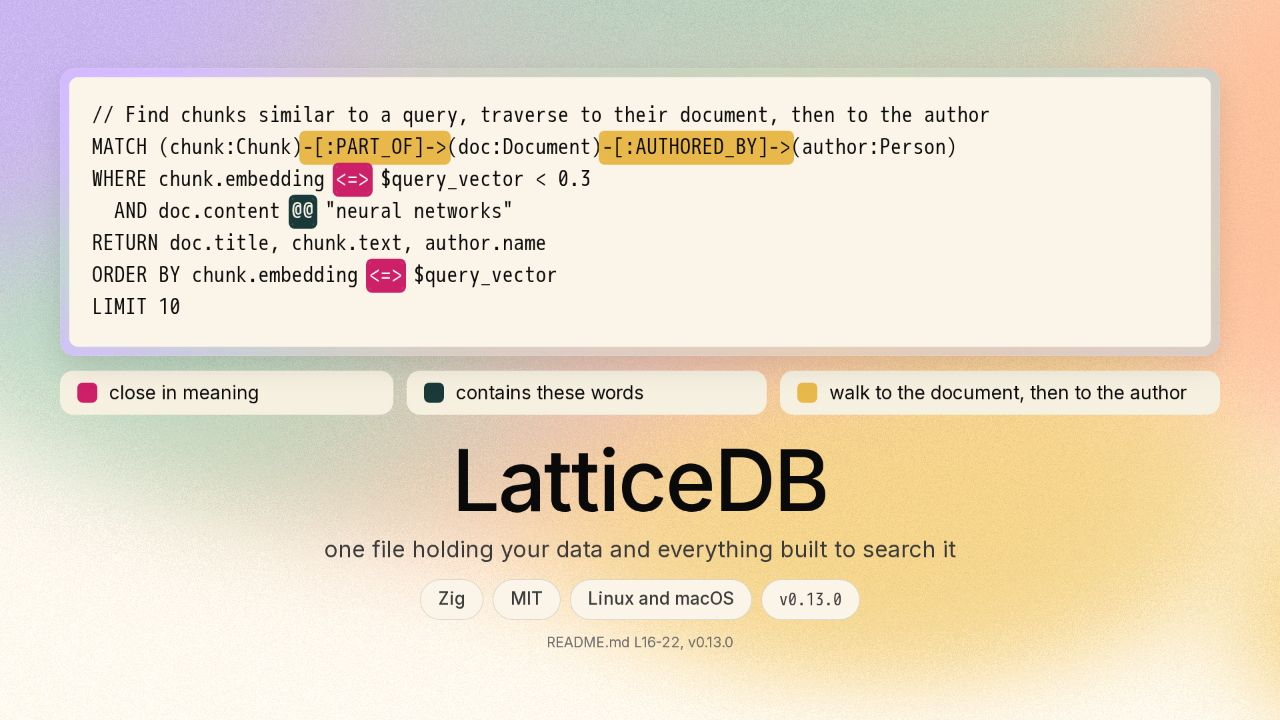
You have searched your own email for a message you could see, and it wasn&#8217;t there. This is LatticeDB, and one question runs three kinds of search. It finds paragraphs that mean what you asked for, even without your words in them. It finds the paragraphs that do contain your words. Then the question walks from a paragraph to its document, and on to the author. All three are in one file.

There is no server to run and nothing to configure

one patch of memory that everything reads and writes through
one file on your disk
book/src/assets/diagrams/engine-stack.svg, v0.13.0

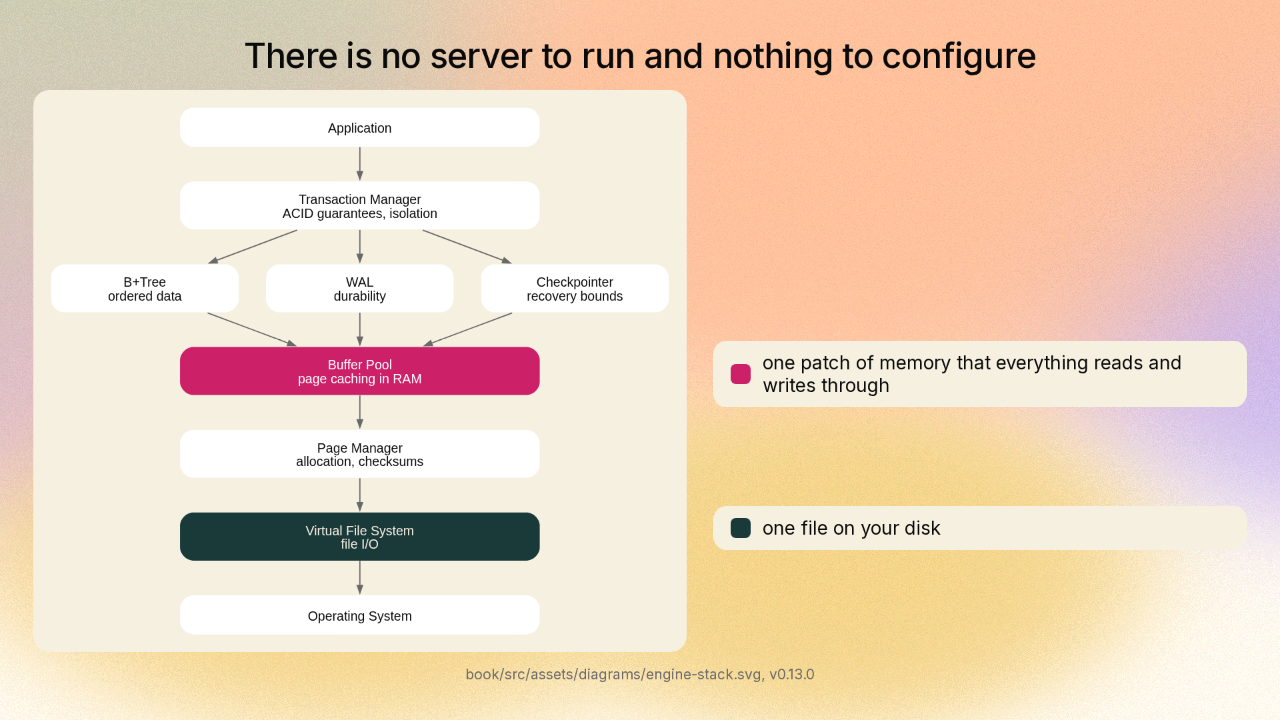
You open LatticeDB the way you open a file. Every part of LatticeDB reads and writes through one patch of memory, and underneath that, one file. Everything you store ends up in that one file.

A search index is a second structure built from your data

the graph storage layer the project draws: symbols, nodes, edges and a label index, each its own B+Tree
this is your data
the project’s word-index pipeline: tokenizer, dictionary, posting list, scorer
the posting list is pages of doc ids and term frequencies
book/src/assets/diagrams/graph-storage-btrees.svg · …/hnsw-layers.svg · …/fts-pipeline.svg

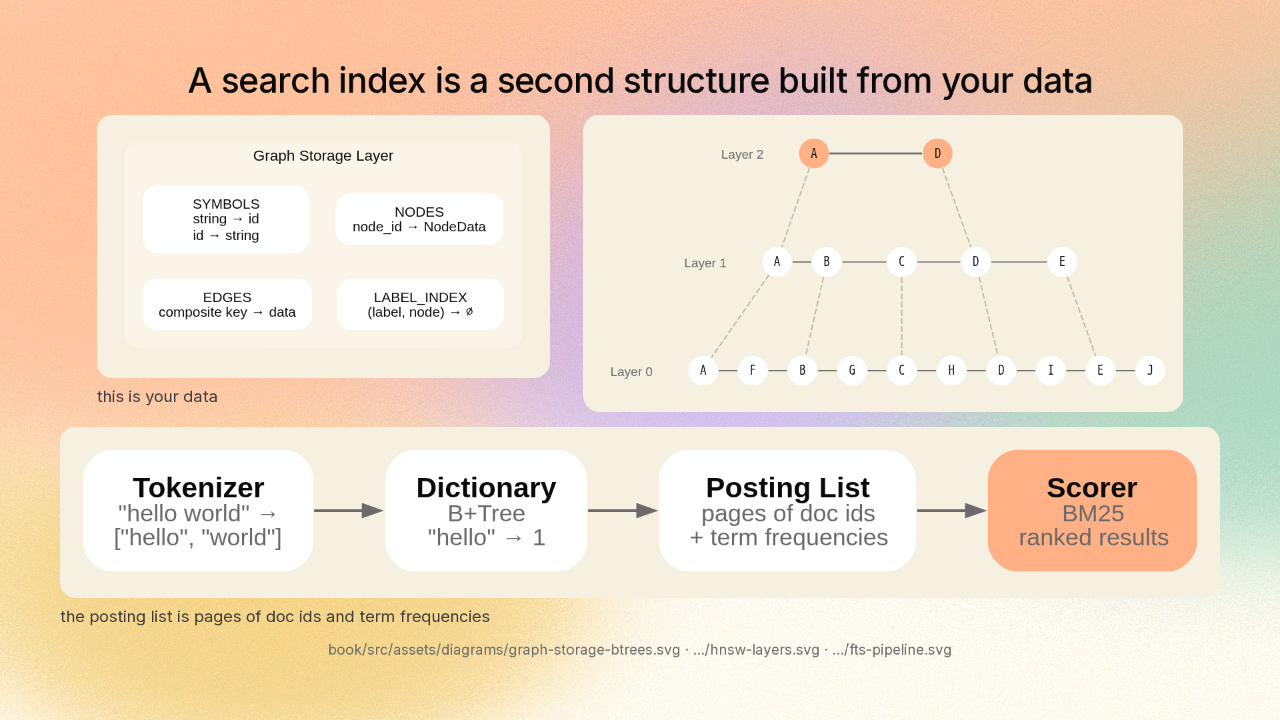
Here is your data: your things, and the links between them. To search it quickly, LatticeDB builds two more structures out of it. The meaning index is layers of links between your items: a few long jumps at the top, every item at the bottom. The word index is a dictionary from each word to the items containing that word. Change your data, and both indexes change too.

The search index is made of the same blocks as the data

4 KB default
“The entire database is built on fixed-size pages (4KB by default)”
book/src/architecture/overview.md L46
0
1
2
3
4
5
6
7
8
9
10
11
12
13
14
15
16
17
18
19
20
where its numbers are
where its neighbours are
SERIALIZED_SIZE: usize = 8 + 1 + 6 + 6; // 21 bytes
/// Connection pool that packs multiple nodes' connections into shared pages.
src/vector/hnsw.zig L173-180 · L171 · L248
pub const PageType = enum(u8) {
free = 0x00,
btree_internal = 0x01,
btree_leaf = 0x02,
overflow = 0x03,
vector_data = 0x04,
hnsw_layer = 0x05,
fts_dictionary = 0x06,
fts_posting = 0x07,
freelist = 0x08,
schema = 0x09,
segment_directory = 0x0A,
};
src/storage/page.zig L14-26, v0.13.0

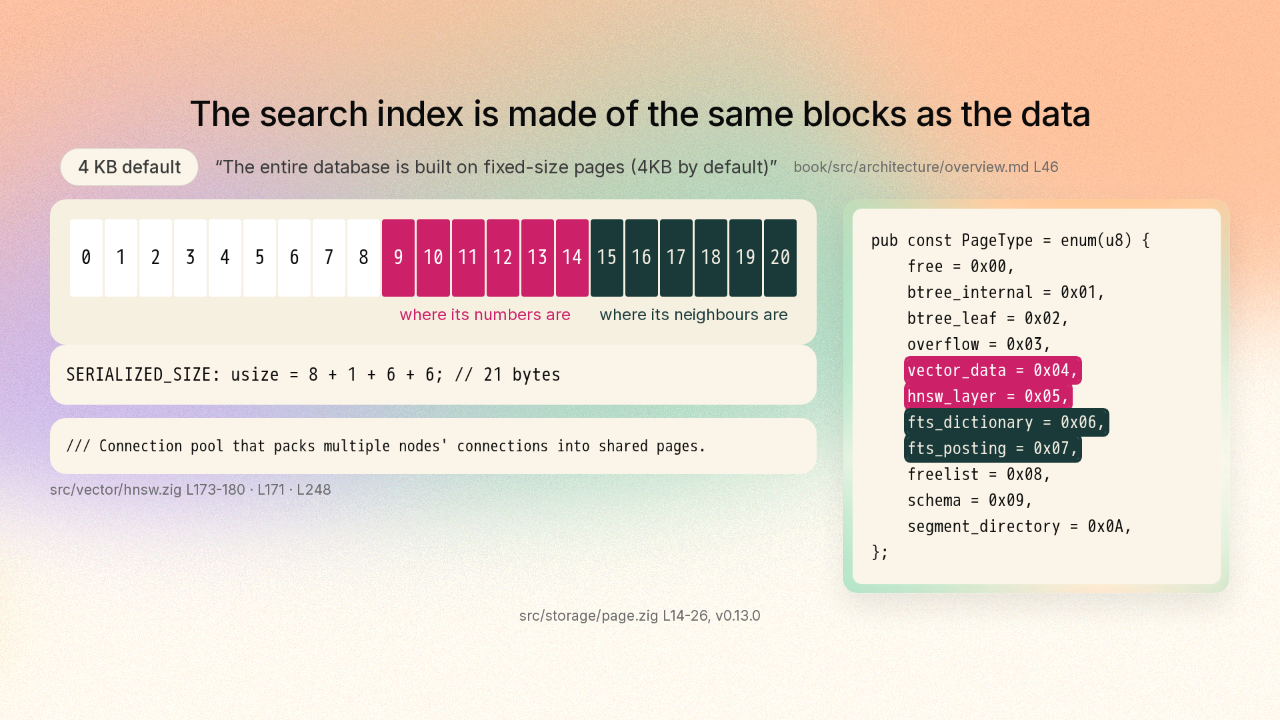
Here is the part worth knowing. This whole file is nothing but blocks, four kilobytes each. The meaning index keeps one record for each item, and that record is twenty-one bytes. Eight bytes name the item. One byte says how high it sits in those layers. And the last twelve bytes are two addresses: which block holds its numbers, and which block holds its links to its neighbours. The links are in blocks too. The project calls a block a page, and its own comment says the connections for many items get packed into shared pages. Every block carries a tag saying what it holds. The tags for the two search indexes sit in the same list as the tags for your data.

One numbered list says where every structure starts

/// Tree index for accessing tree_roots array
pub const TreeIndex = enum(u8) {
node = 0,
edge = 1,
label = 2,
symbol_forward = 3,
symbol_reverse = 4,
fts_dict = 5,
fts_lengths = 6,
fts_reverse = 7,
hnsw_node = 8,
…
};
7 entries elided
pub const MAX_TREES: usize = 16;
/// File header structure (first 4KB of database file)
pub const FileHeader = extern struct {
…
tree_roots: [MAX_TREES]PageId, // B+Tree root pages
…
};
one patch of memory→one file
one checksum format for every block
src/storage/page.zig L45-63, L66, L68, L82 · src/storage/page.zig L28-33 · src/storage/page_manager.zig

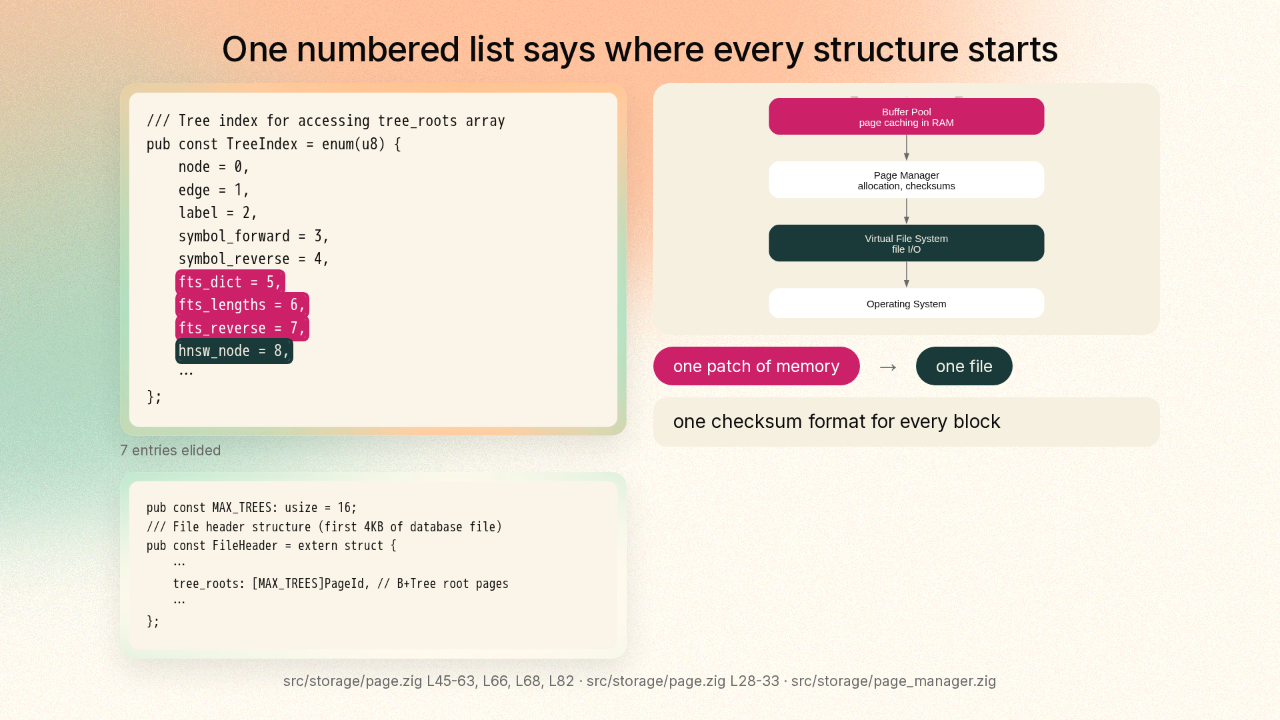
The very first block of the file holds one numbered list. Your things are number zero. Your links are number one. Five, six and seven are the word index, and eight is the meaning index. The list is sixteen slots long, and each slot holds the block where one structure starts. Every one of those blocks also carries the same kind of checksum, so one routine can tell whether any block in the file is intact.

Open a file and start working

CLI
curl -fsSL …/dist/install.sh | bash
Python
pip install latticedb
TypeScript
npm install @hajewski/latticedb
Go
cgo, see bindings/go
MITv0.13.0Zig, no dependencies
Linux x86_64Linux aarch64macOS x86_64macOS aarch64
built for one program on one machine owning the file
Speaks most of Cypher, the standard graph query language · OPTIONAL MATCH and CALL not built yet
Continuous backup ships changes to a directory and restores to a point in time
README.md install section and L404 · releases/latest v0.13.0, 2026-08-26 · in-tree LICENSE

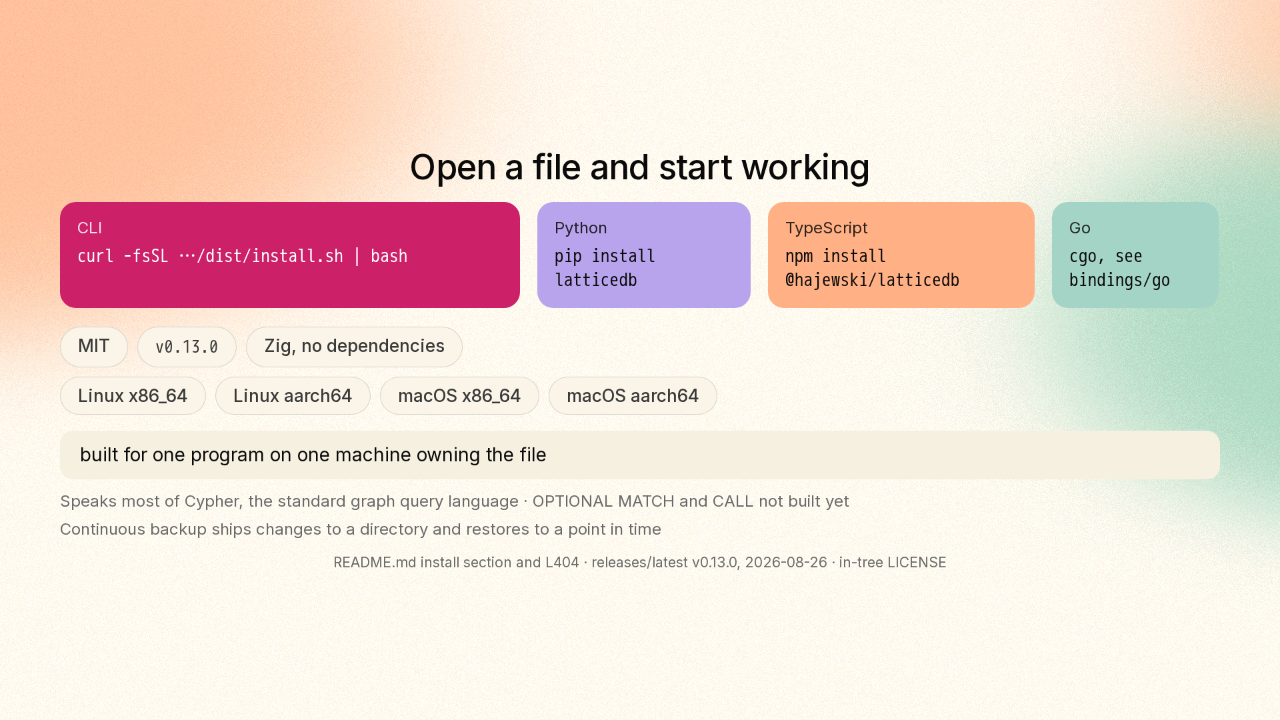
All of that has a name. LatticeDB is an embedded graph database: your things and their links, in a file your own program opens. One line installs the command line tool, and three languages have libraries: Python, TypeScript and Go. LatticeDB is open source under the MIT licence, and it depends on nothing else. Version zero point thirteen has builds for Linux and macOS, on both Intel and ARM. It is built for one program on one machine owning the file.

There is no second copy to keep in step

github.com/jeffhajewski/latticedb
MIT · v0.13.0

Searching means building a second structure out of your data. Here that second structure is made of the same blocks as the data, in the same file. That is jeff hajewski slash latticedb, on GitHub. New repo tomorrow.











