Voicebox clones a voice entirely on your own machine

2 months ago

Your voice can be copied now. This one does it on the machine in front of you, with nothing sent anywhere. voicebox clones a voice, types what you say, and gives your coding agent a voice to answer in. Free, MIT-licensed, completely offline.

Ask

Ask about this presentation

Answers are generated from this presentation.

Chapters

  1. 0:00Voicebox clones a voice entirely on your own machine
  2. 0:14It's a desktop voice studio.
  3. 0:34Cloning is almost no ceremony.
  4. 0:49Down the loop: your voice becomes clean text.
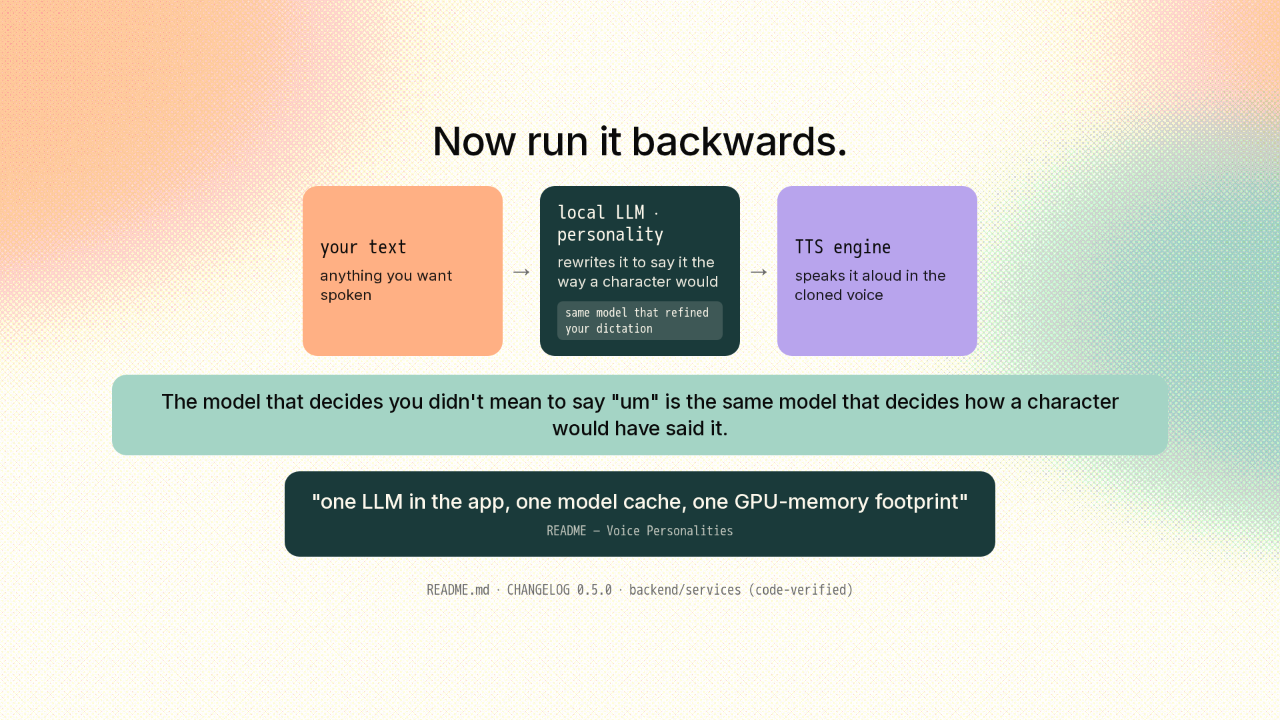
  5. 1:11Now run it backwards.
  6. 1:33Your agent gets a voice.
  7. 1:53Seven engines, and they're not interchangeable.
  8. 2:17Get it.
  9. 2:36The whole loop stays on your desk.
Show transcript

Voicebox clones a voice entirely on your own machine

GitHub Trending · Ep 16 · Jul 20, 2026
the whole voice loop, running on your own machine.
TypeScript MIT macOS + Windows

Your voice can be copied now. This one does it on the machine in front of you, with nothing sent anywhere. voicebox clones a voice, types what you say, and gives your coding agent a voice to answer in. Free, MIT-licensed, completely offline.

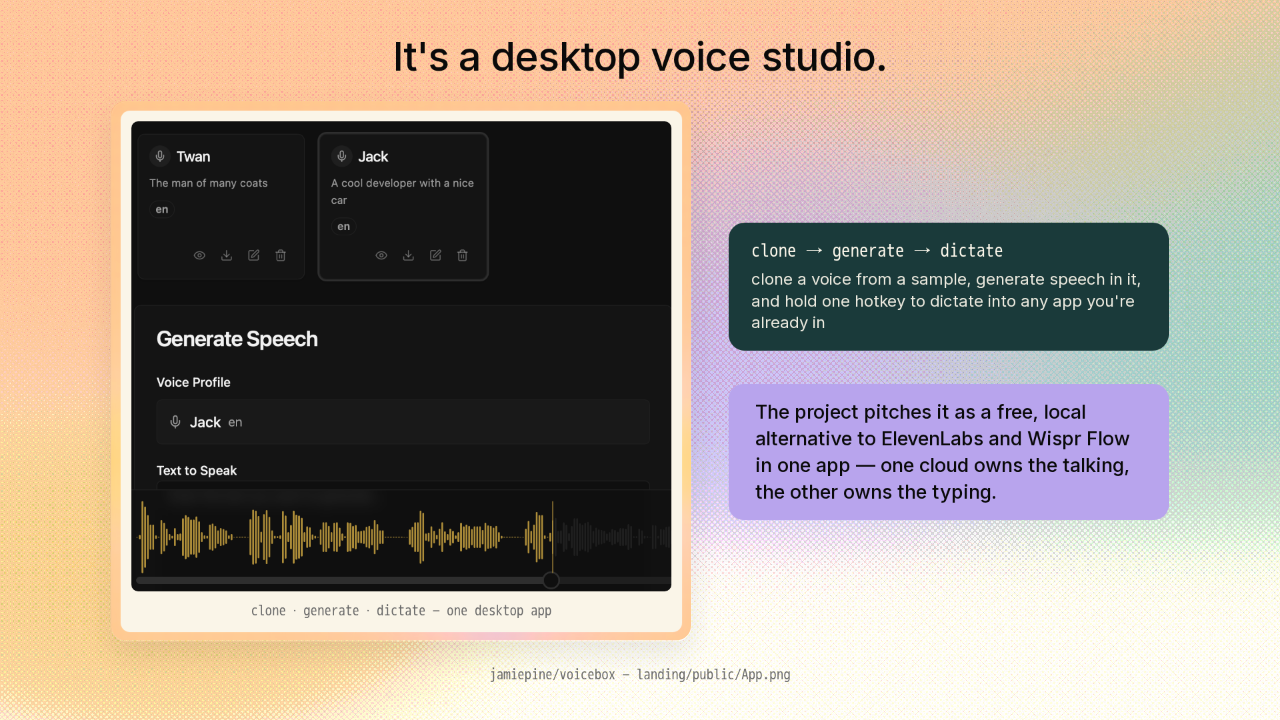
It's a desktop voice studio.

clone · generate · dictate — one desktop app
clone → generate → dictate
clone a voice from a sample, generate speech in it, and hold one hotkey to dictate into any app you're already in
The project pitches it as a free, local alternative to ElevenLabs and Wispr Flow in one app — one cloud owns the talking, the other owns the typing.
jamiepine/voicebox — landing/public/App.png

It's a desktop voice studio. You clone a voice from a sample, generate speech in that voice, and hold one hotkey to dictate into any app you're already in. The project pitches it as a free, local alternative to ElevenLabs and Wispr Flow in one app. Its argument: one cloud owns the talking, the other owns the typing, and voicebox runs both on your machine.

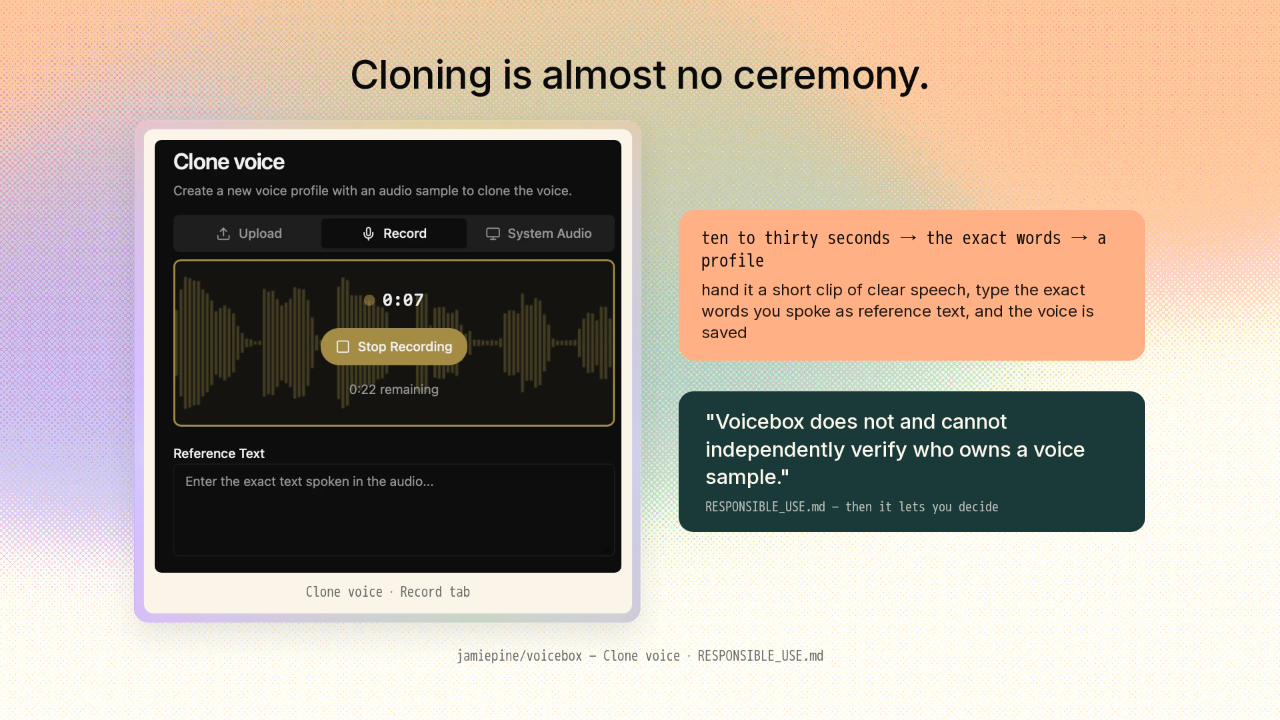
Cloning is almost no ceremony.

voicebox Clone voice panel: Upload, Record and System Audio tabs, a live recording waveform at 7 seconds with 22 seconds remaining, a Stop Recording button, and a Reference Text field
Clone voice · Record tab
ten to thirty seconds → the exact words → a profile
hand it a short clip of clear speech, type the exact words you spoke as reference text, and the voice is saved
"Voicebox does not and cannot independently verify who owns a voice sample."
RESPONSIBLE_USE.md — then it lets you decide
jamiepine/voicebox — Clone voice · RESPONSIBLE_USE.md

Cloning is almost no ceremony. Hand it ten to thirty seconds of clear speech, tell it the exact words you spoke, and you have a profile. And the project says the quiet part in the app itself: it does not and cannot check whose voice you handed it. Then it lets you decide.

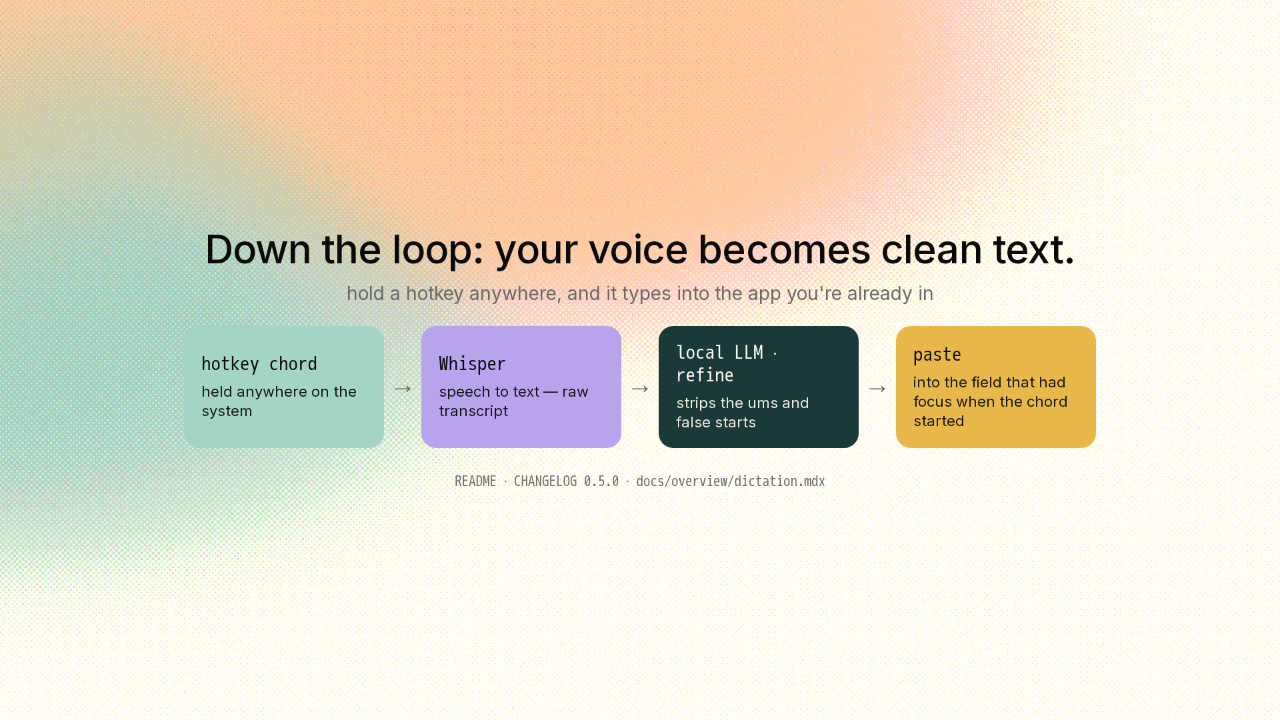
Down the loop: your voice becomes clean text.

hold a hotkey anywhere, and it types into the app you're already in
hotkey chord
held anywhere on the system
→
Whisper
speech to text — raw transcript
→
local LLM · refine
strips the ums and false starts
→
paste
into the field that had focus when the chord started
README · CHANGELOG 0.5.0 · docs/overview/dictation.mdx

Here's how the typing half works. You hold a chord anywhere on the system. Your voice goes to Whisper. Out comes raw text. That text goes to a small local model that strips the ums and false starts. Then it pastes the clean text for you. And this part's clever: it pastes into the field that had focus when you started the chord, not wherever it drifted while you talked.

Now run it backwards.

your text
anything you want spoken
→
local LLM · personality
rewrites it to say it the way a character would
same model that refined your dictation
→
TTS engine
speaks it aloud in the cloned voice
The model that decides you didn't mean to say "um" is the same model that decides how a character would have said it.
"one LLM in the app, one model cache, one GPU-memory footprint"
README — Voice Personalities
README.md · CHANGELOG 0.5.0 · backend/services (code-verified)

Now run it backwards. You hand it text, and the same local model rewrites it. Not to clean it up this time, but to say it the way a character would. Then it goes out through one of the speech engines. Here's the idea. The model that decides you didn't mean to say um is the same model that decides how a character would have said it. One local model doing both jobs, not two. The project's own line is on the slide.

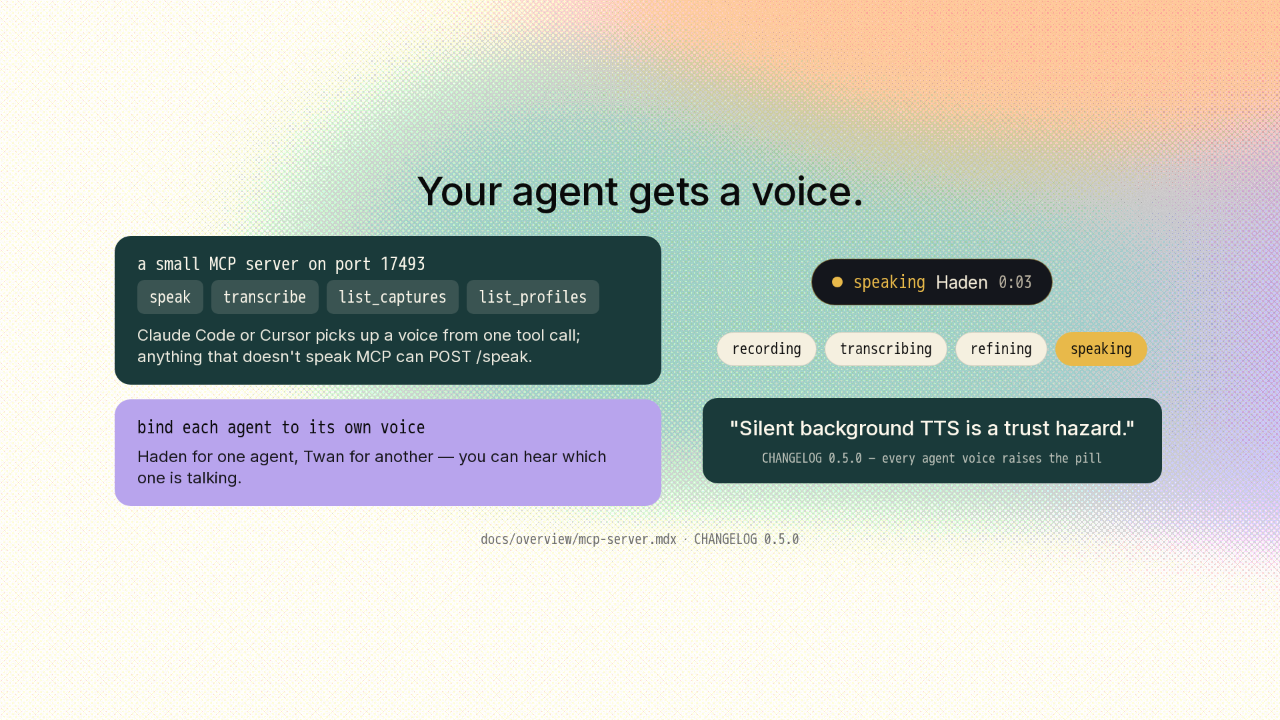
Your agent gets a voice.

a small MCP server on port 17493
speak transcribe list_captures list_profiles
Claude Code or Cursor picks up a voice from one tool call; anything that doesn't speak MCP can POST /speak.
bind each agent to its own voice
Haden for one agent, Twan for another — you can hear which one is talking.
speaking Haden 0:03
recording transcribing refining speaking
"Silent background TTS is a trust hazard."
CHANGELOG 0.5.0 — every agent voice raises the pill
docs/overview/mcp-server.mdx · CHANGELOG 0.5.0

Now hand that loop to your coding agent. voicebox runs a small MCP server, so Claude Code or Cursor picks up a voice from one tool call. Bind each agent to its own voice, and you can hear which one is talking. And it can never speak behind your back. Every agent voice raises the same pill your dictation does. The project's reason: silent background speech is a trust hazard.

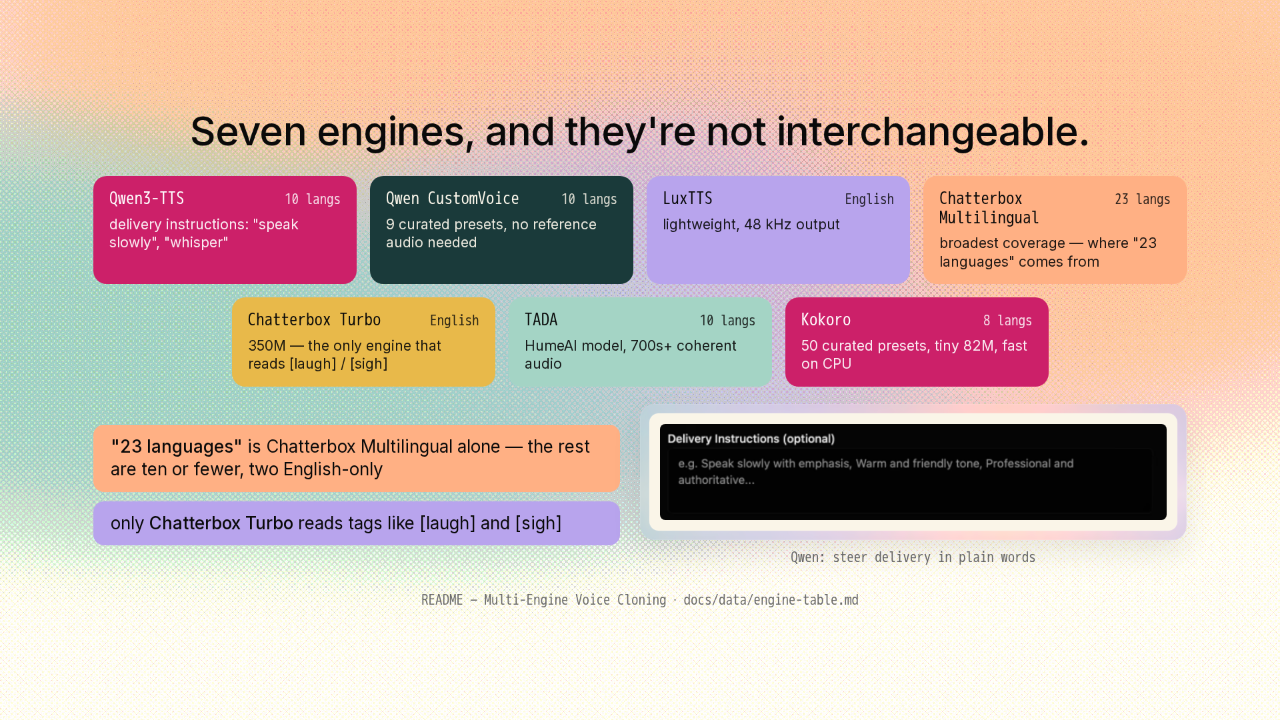
Seven engines, and they're not interchangeable.

Qwen3-TTS10 langs
delivery instructions: "speak slowly", "whisper"
Qwen CustomVoice10 langs
9 curated presets, no reference audio needed
LuxTTSEnglish
lightweight, 48 kHz output
Chatterbox Multilingual23 langs
broadest coverage — where "23 languages" comes from
Chatterbox TurboEnglish
350M — the only engine that reads [laugh] / [sigh]
TADA10 langs
HumeAI model, 700s+ coherent audio
Kokoro8 langs
50 curated presets, tiny 82M, fast on CPU
"23 languages" is Chatterbox Multilingual alone — the rest are ten or fewer, two English-only
only Chatterbox Turbo reads tags like [laugh] and [sigh]
Qwen: steer delivery in plain words
README — Multi-Engine Voice Cloning · docs/data/engine-table.md

Here's what the headlines get wrong. voicebox isn't one voice model with a UI on it. It's a switchboard over seven, and you pick one per job. That "23 languages" number? That's a single engine, Chatterbox Multilingual. The rest are ten languages or fewer, and two are English only. And only Chatterbox Turbo reads tags like laugh and sigh. On the Qwen engine you steer delivery in plain words: speak slowly, warm and friendly.

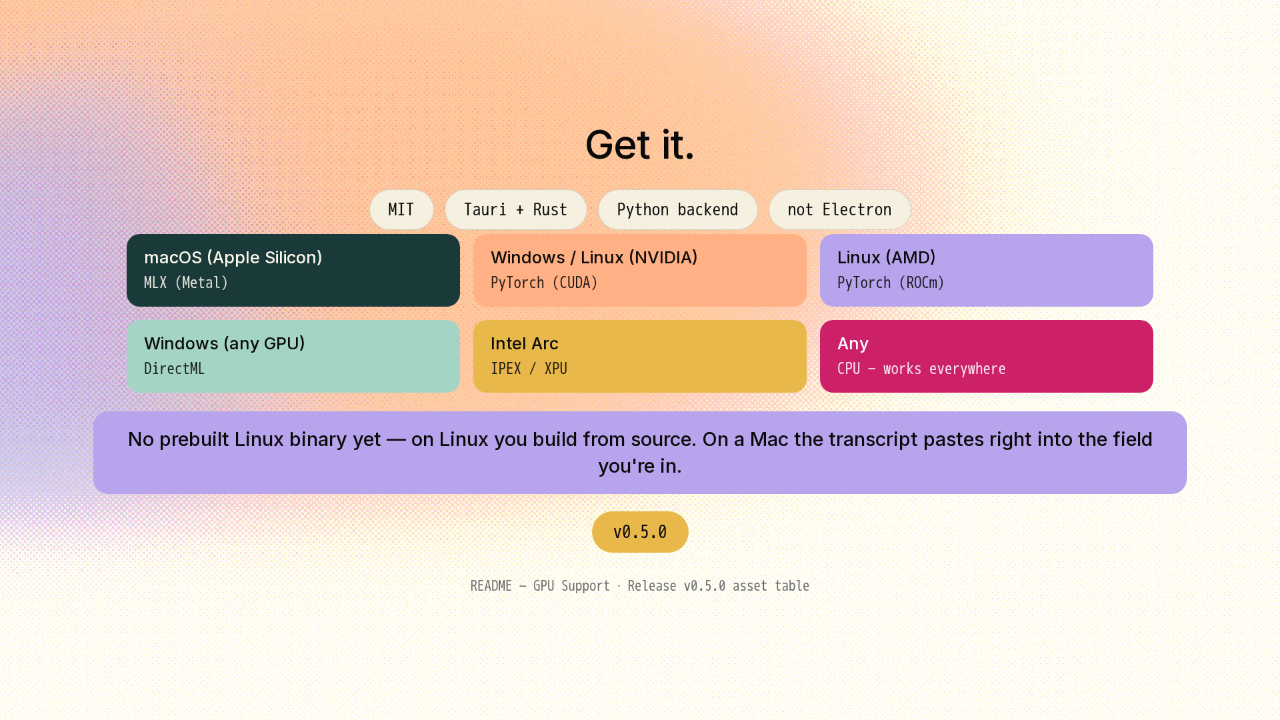
Get it.

MIT Tauri + Rust Python backend not Electron
macOS (Apple Silicon)
MLX (Metal)
Windows / Linux (NVIDIA)
PyTorch (CUDA)
Linux (AMD)
PyTorch (ROCm)
Windows (any GPU)
DirectML
Intel Arc
IPEX / XPU
Any
CPU — works everywhere
No prebuilt Linux binary yet — on Linux you build from source. On a Mac the transcript pastes right into the field you're in.
v0.5.0
README — GPU Support · Release v0.5.0 asset table

Getting it. It's MIT, built on Tauri and Rust with a Python backend, not another Electron app. It runs on Apple Silicon, NVIDIA, AMD, Intel, or plain CPU. One caveat: there's no prebuilt Linux binary yet, so on Linux you build from source. On a Mac the transcript pastes right into the field you're in. Latest version is 0.5.0.

The whole loop stays on your desk.

voicebox — the gold microphone mark
github.com/jamiepine/voicebox
New repo tomorrow.

So if you assumed that copying a voice means handing it to somebody's cloud, this is the version where the whole loop stays on your desk. Clone, dictate, and give your agent a voice, all offline. The link is on screen. New repo tomorrow.











