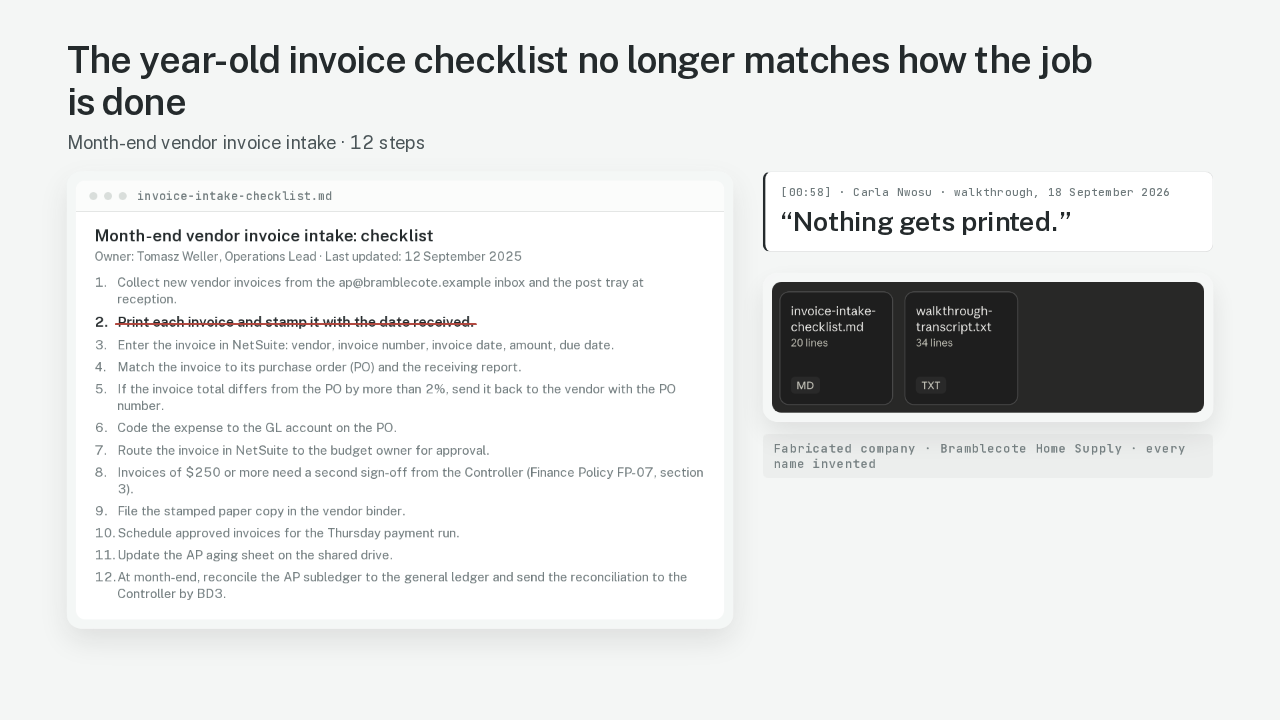
The year-old invoice checklist no longer matches how the job is done
Month-end vendor invoice intake: checklist
- 1.Collect new vendor invoices from the ap@bramblecote.example inbox and the post tray at reception.
- 2.Print each invoice and stamp it with the date received.
- 3.Enter the invoice in NetSuite: vendor, invoice number, invoice date, amount, due date.
- 4.Match the invoice to its purchase order (PO) and the receiving report.
- 5.If the invoice total differs from the PO by more than 2%, send it back to the vendor with the PO number.
- 6.Code the expense to the GL account on the PO.
- 7.Route the invoice in NetSuite to the budget owner for approval.
- 8.Invoices of $250 or more need a second sign-off from the Controller (Finance Policy FP-07, section 3).
- 9.File the stamped paper copy in the vendor binder.
- 10.Schedule approved invoices for the Thursday payment run.
- 11.Update the AP aging sheet on the shared drive.
- 12.At month-end, reconcile the AP subledger to the general ledger and send the reconciliation to the Controller by BD3.
“Nothing gets printed.”
Step two of this checklist says print and stamp every invoice. The person who runs the job has stopped printing. Claude Docs can line up an old checklist against the transcript of a walkthrough, and hand back every step that changed. An operations lead owns this kind of document. It's called an SOP, a standard operating procedure, the written how-we-do-it for one job. Each new vendor, approval step or hire makes the SOP a little more out of date. The company here is Bramblecote Home Supply. I made up the company, both files, and every person in them. The walkthrough is Carla Nwosu, the accounts payable specialist who pays the vendor bills, talking through the job as it runs today.
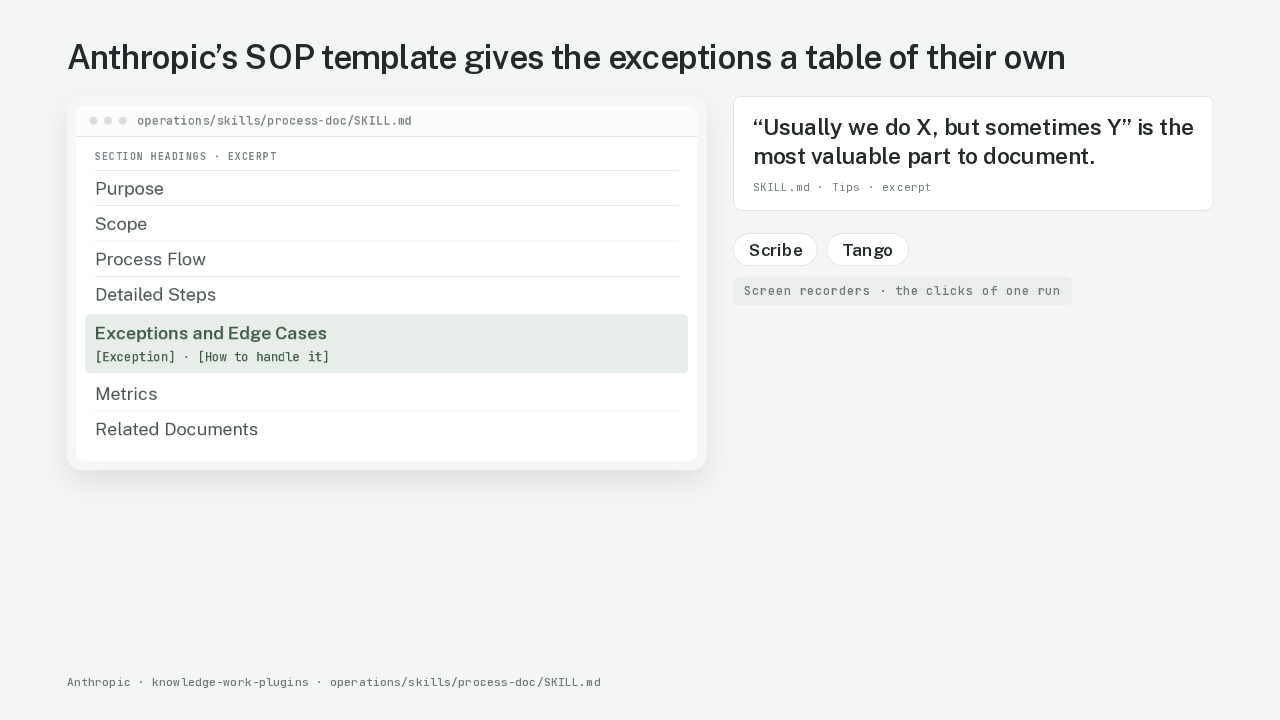
Anthropic’s SOP template gives the exceptions a table of their own
“Usually we do X, but sometimes Y” is the most valuable part to document.
Anthropic publishes a template for this kind of document. The template is a skill file for Claude, meaning a written set of instructions Claude follows for one kind of job. The file's tip says the most valuable part to write down is, usually we do X, but sometimes Y. A checklist records the usually. The sometimes comes out when someone talks the job through. Screen recorders like Scribe and Tango turn the clicks of one run into a list of steps. A recorder never saw your old checklist, so a recorder can't show you what changed.
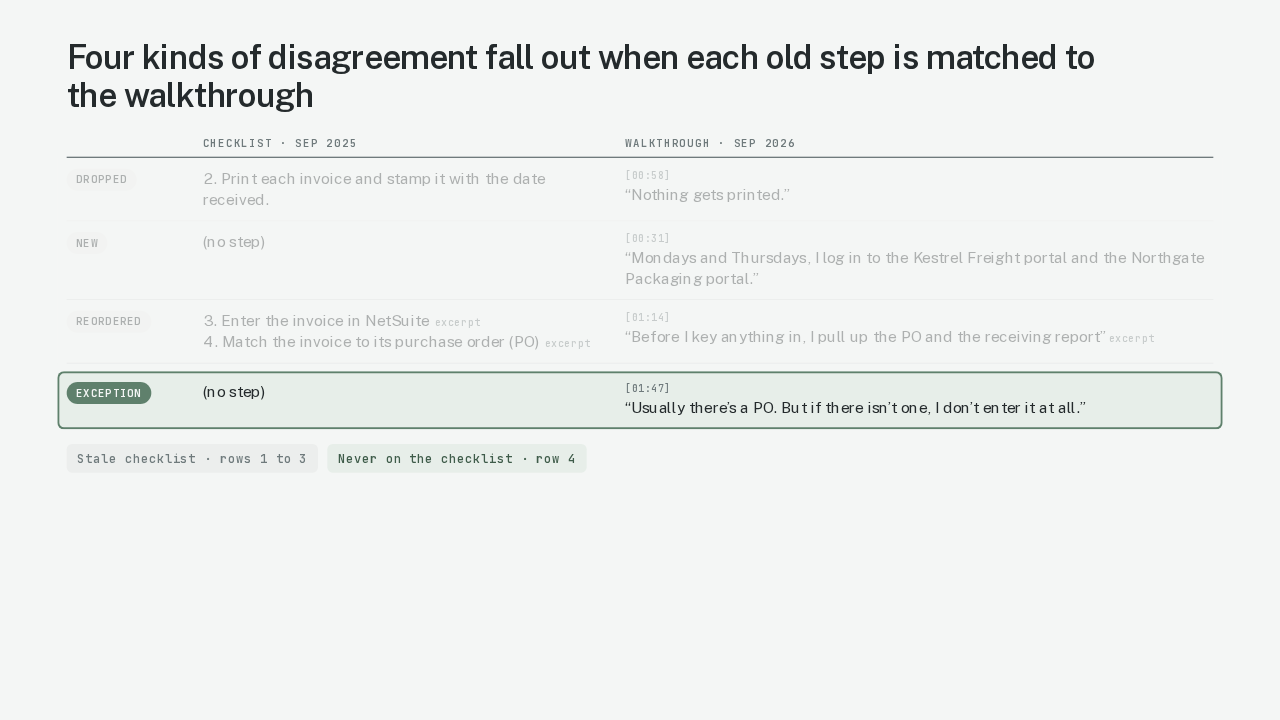
Four kinds of disagreement fall out when each old step is matched to the walkthrough
4. Match the invoice to its purchase order (PO)excerpt
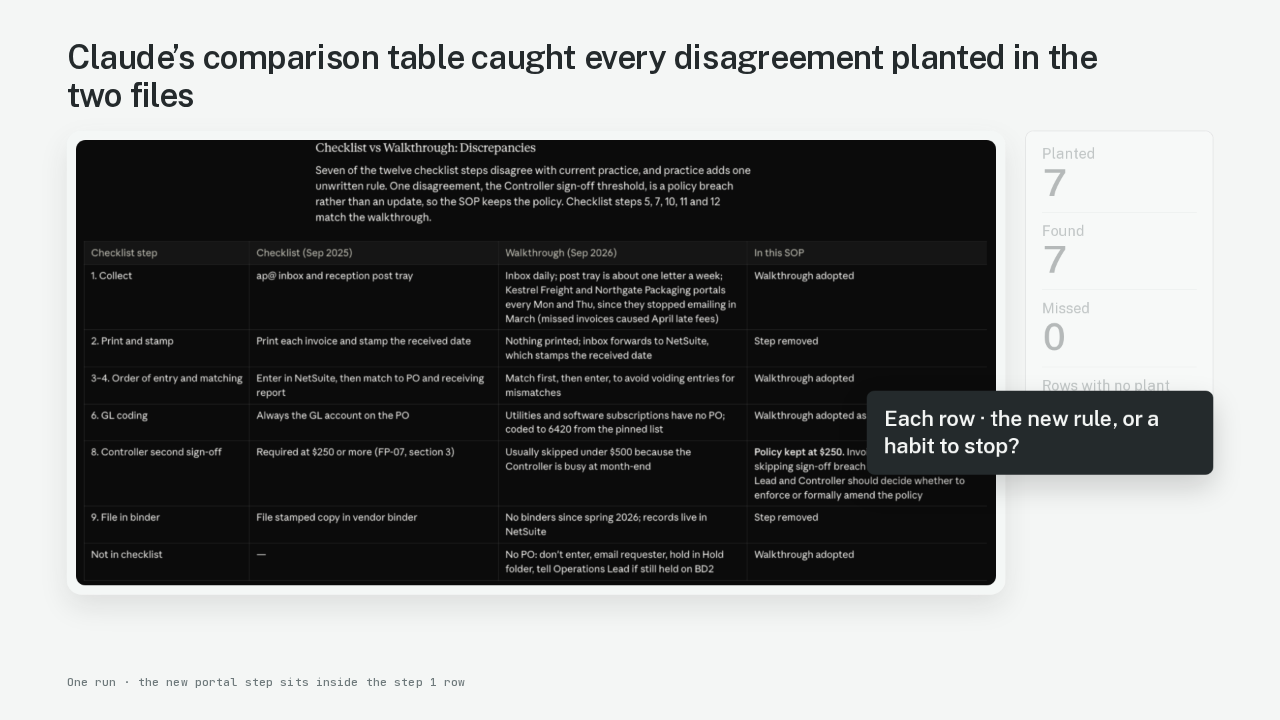
The table I asked for lists every step where the checklist and the walkthrough disagree. To build it, Claude pairs each checklist step with what Carla does at that point in the walkthrough. Four kinds of disagreement come out of that. The first kind is a dropped step. The checklist says print and stamp, and Carla says nothing gets printed. The second kind is a new step. Two vendors stopped emailing their invoices in March, so Carla now downloads them from each vendor's website every Monday and Thursday. The third kind is a changed order. The checklist enters each invoice in NetSuite, the accounting system, and then checks it against the purchase order, the form that says what the company agreed to buy. Carla checks first, because a bad invoice entered early has to be cancelled later. The fourth kind is an exception. Carla says, usually there's a purchase order, but if there isn't one, I don't enter it at all. The first three kinds show the checklist going stale. The exception is the kind the checklist never had.
Claude’s comparison table caught every disagreement planted in the two files
Before the run, I wrote down seven disagreements and hid them in the two files. They were two dropped steps, one new step, one changed order, two exceptions and one approval limit. An approval limit is the dollar amount above which a second person has to sign off on a bill. On my run, Claude's table came back with seven rows, and every one of the seven lines up with something I hid. The new website step sits inside the row for step one, collecting invoices. Each row of that table is one question for the ops lead. Is the walkthrough the new rule, or a habit that should stop? The lead answers it in a few seconds per row, and the SOP is those answers written out.
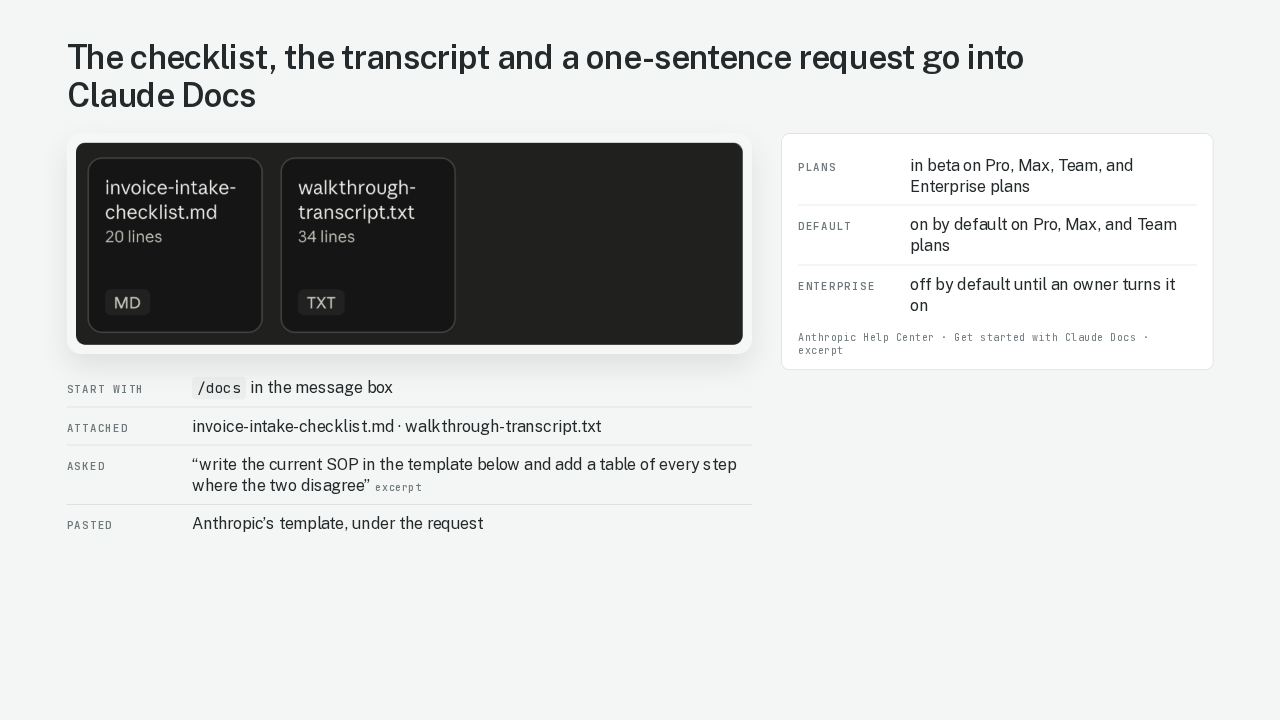
The checklist, the transcript and a one-sentence request go into Claude Docs
| Start with | /docs in the message box |
|---|---|
| Attached | invoice-intake-checklist.md · walkthrough-transcript.txt |
| Asked | “write the current SOP in the template below and add a table of every step where the two disagree”excerpt |
| Pasted | Anthropic’s template, under the request |
| Plans | in beta on Pro, Max, Team, and Enterprise plans |
|---|---|
| Default | on by default on Pro, Max, and Team plans |
| Enterprise | off by default until an owner turns it on |
Claude Docs is Anthropic's new document editor inside Claude. You ask, and Claude writes a doc you can edit. I typed slash docs in the message box and attached the two files. The walkthrough went in as its transcript, a text file of what Carla said. Then I typed one sentence. Using the old checklist and the walkthrough transcript, write the current SOP in the template below and add a table of every step where the two disagree. Under that sentence I pasted Anthropic's template. Claude Docs is in beta. It's on by default on the Pro, Max and Team plans. On Enterprise, an owner has to switch it on first.
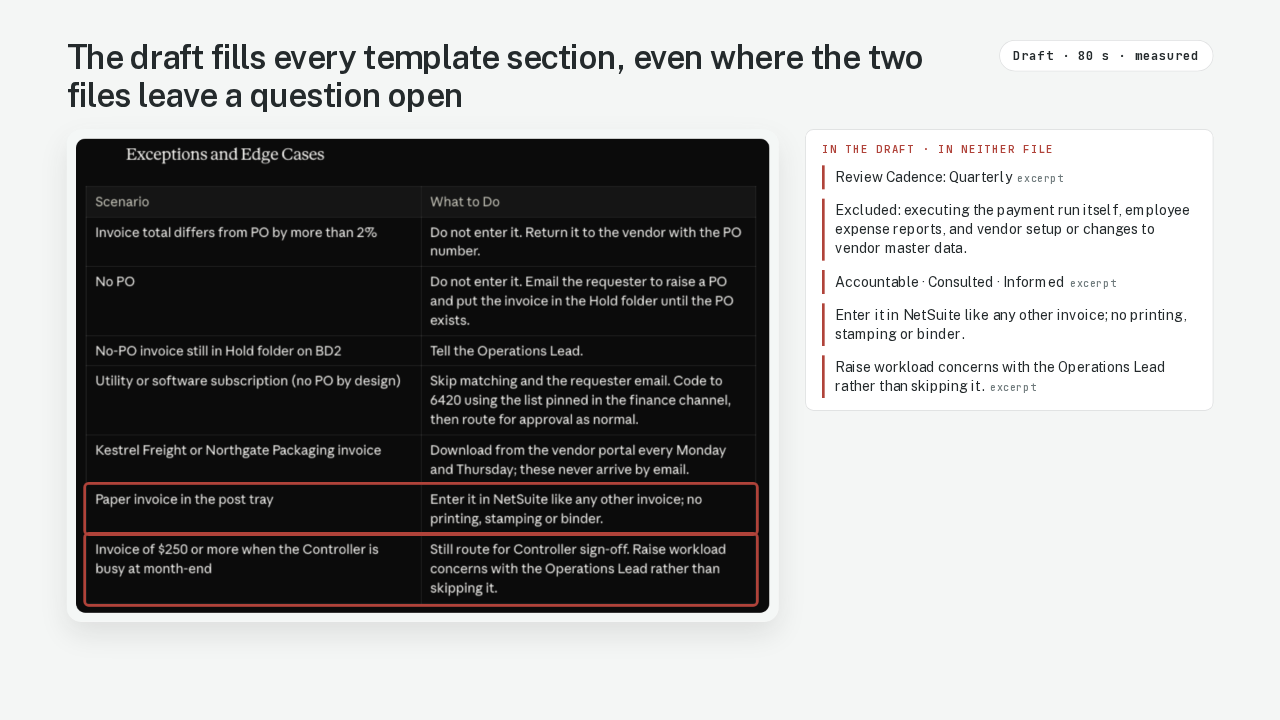
The draft fills every template section, even where the two files leave a question open
In the draft · in neither file
Claude wrote the draft in eighty seconds, and I timed it. The draft's exceptions table carries Carla's exceptions in Carla's words. Five lines in the draft come from neither file. The draft says the SOP gets reviewed every quarter. The draft lists what the process leaves out, like employee expense reports. The draft names who is accountable for each step. An exceptions row says a paper invoice from the post tray goes into NetSuite like any other invoice, and Carla's walkthrough never says how a paper letter gets there. The last is a new rule about raising workload concerns with the ops lead. Each of those five lines reads like a fact from the files.
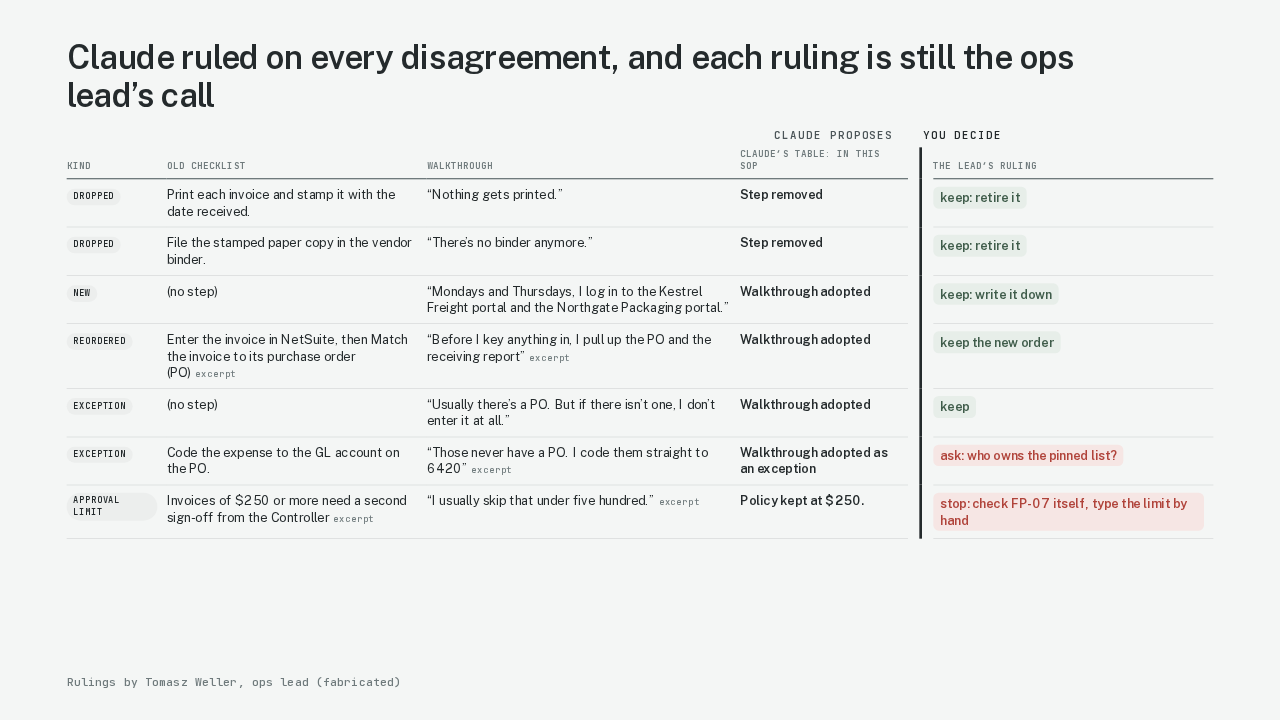
Claude ruled on every disagreement, and each ruling is still the ops lead’s call
| Kind | Old checklist | Walkthrough | Claude’s table: In this SOP | The lead’s ruling | |
|---|---|---|---|---|---|
| Dropped | Print each invoice and stamp it with the date received. | “Nothing gets printed.” | Step removed | keep: retire it | |
| Dropped | File the stamped paper copy in the vendor binder. | “There’s no binder anymore.” | Step removed | keep: retire it | |
| New | (no step) | “Mondays and Thursdays, I log in to the Kestrel Freight portal and the Northgate Packaging portal.” | Walkthrough adopted | keep: write it down | |
| Reordered | Enter the invoice in NetSuite, then Match the invoice to its purchase order (PO)excerpt | “Before I key anything in, I pull up the PO and the receiving report”excerpt | Walkthrough adopted | keep the new order | |
| Exception | (no step) | “Usually there’s a PO. But if there isn’t one, I don’t enter it at all.” | Walkthrough adopted | keep | |
| Exception | Code the expense to the GL account on the PO. | “Those never have a PO. I code them straight to 6420”excerpt | Walkthrough adopted as an exception | ask: who owns the pinned list? | |
| Approval limit | Invoices of $250 or more need a second sign-off from the Controllerexcerpt | “I usually skip that under five hundred.”excerpt | Policy kept at $250. | stop: check FP-07 itself, type the limit by hand |
Here is where I'd stop and read it myself. I asked for a table of disagreements. Claude added a column to that table, headed In this SOP, and ruled on every row. Four rows say the walkthrough is adopted. Two rows say the step is removed. The approval limit row says policy kept. Read that column as Claude's proposal. As the ops lead, I mark each row keep, stop or ask. Retiring print and stamp is a keep, because NetSuite stamps the date on its own now. The utility and software bills are an ask. Carla codes those bills straight to one expense account, from a list pinned in the finance channel. Before I adopt that, I want to know who owns the list. The approval limit row gets a stop, and a check of its own.
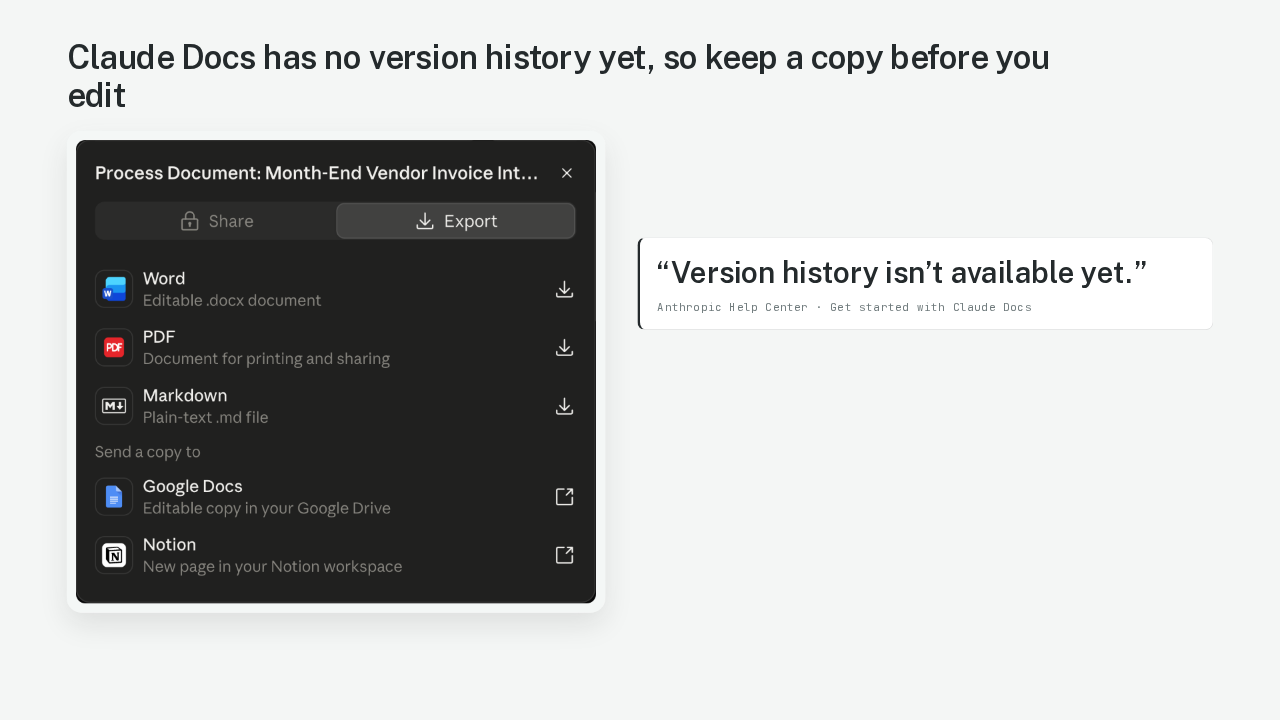
Claude Docs has no version history yet, so keep a copy before you edit
“Version history isn’t available yet.”
When the rows are ruled, the SOP leaves Claude Docs. On my account, the Export panel downloads Word, PDF or Markdown, and sends a copy to Google Docs or Notion. Anthropic's help page says there is no way back to an earlier draft for now. So save the old checklist, and download Claude's first draft before you change it.
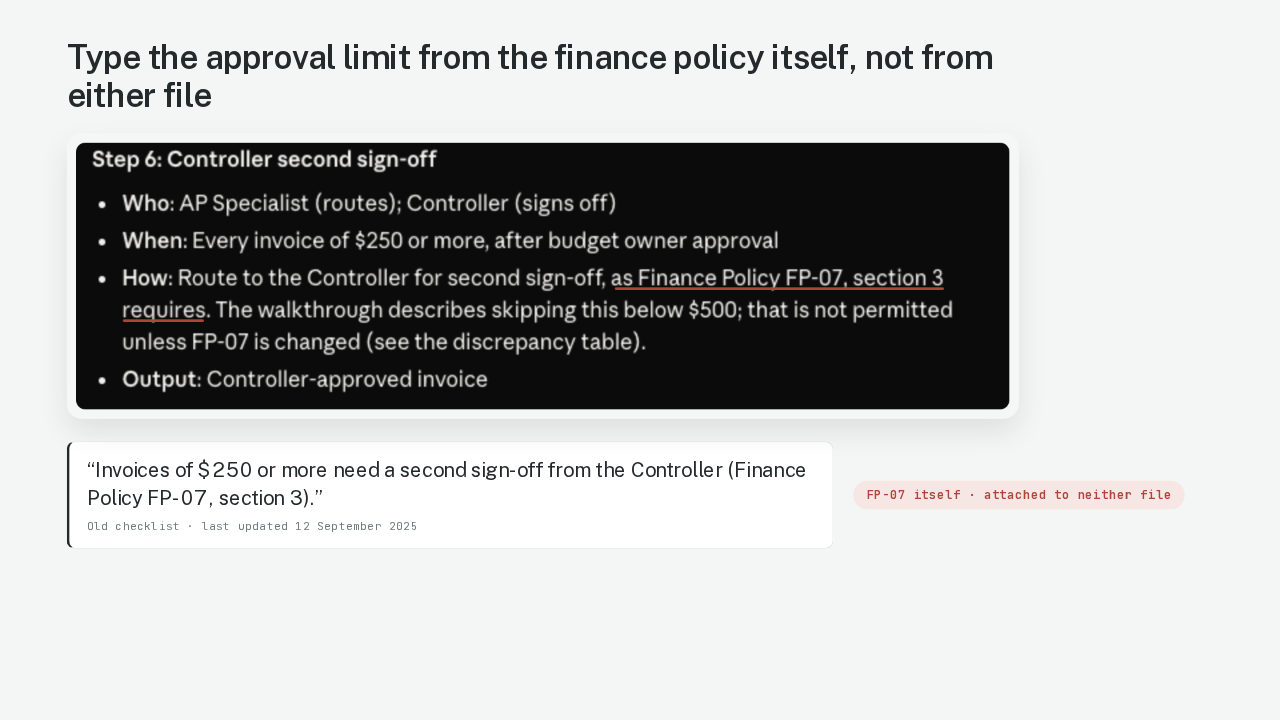
Type the approval limit from the finance policy itself, not from either file
“Invoices of $250 or more need a second sign-off from the Controller (Finance Policy FP-07, section 3).”
Skip Claude for the approval limit. In the walkthrough, Carla usually skips the Controller's sign-off on bills under five hundred dollars. The Controller is the head of accounting. Claude caught that skip. Claude kept the checklist's limit of two hundred and fifty dollars and flagged the skip in its reply to me. Then the draft says the company's finance policy requires that limit. Claude never saw the finance policy. The limit and the policy's name both came from the year-old checklist. So the new SOP cites the policy as if someone had checked it this year. I open the finance policy myself and type the limit in by hand.
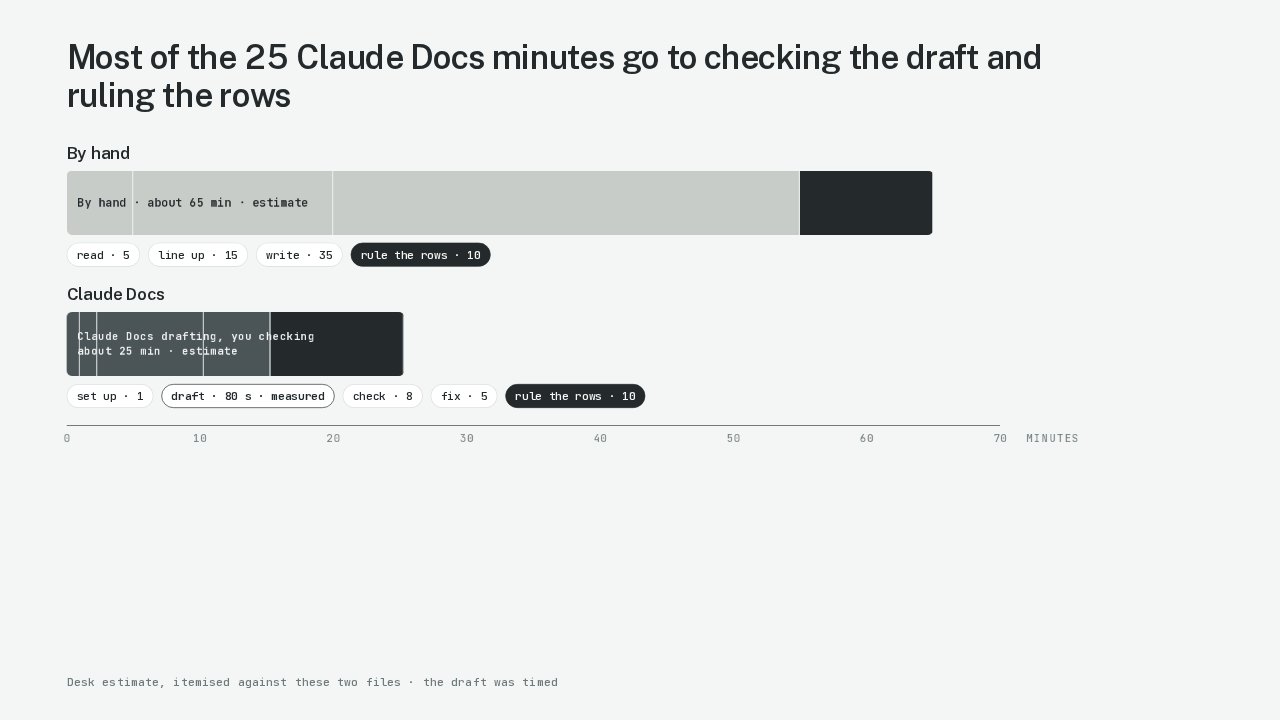
Most of the 25 Claude Docs minutes go to checking the draft and ruling the rows
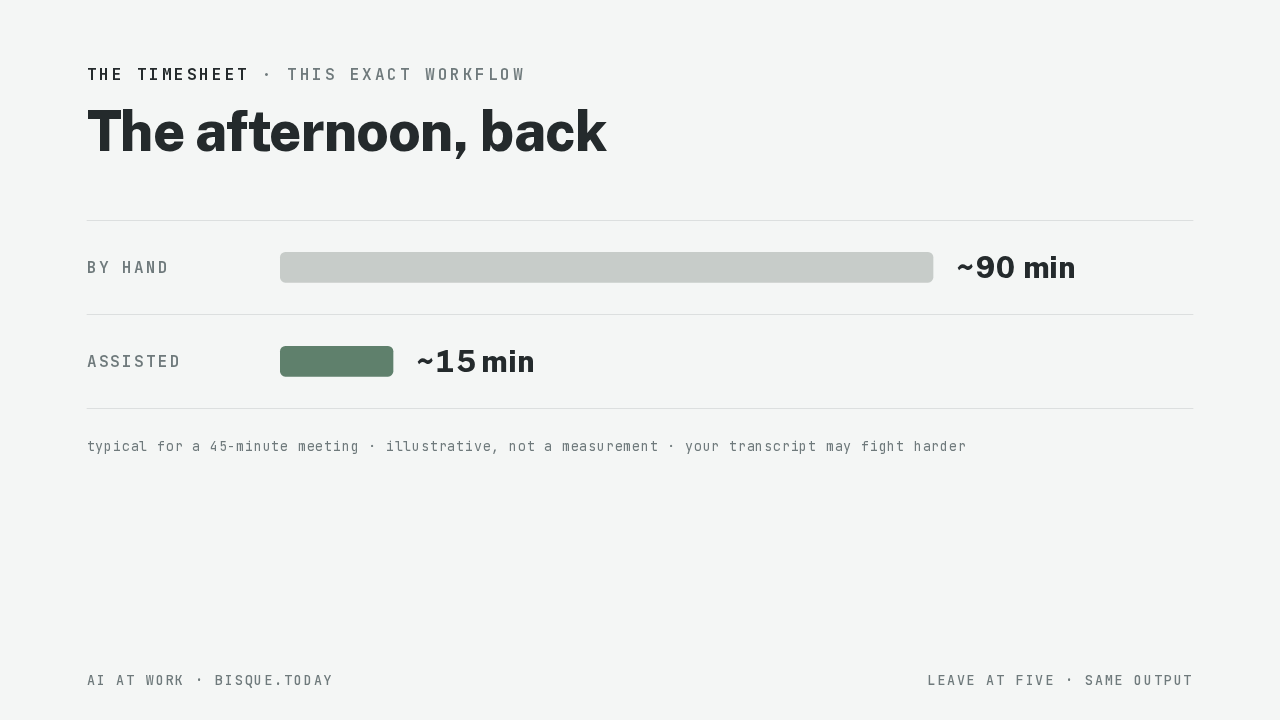
Both totals are estimates for this one SOP, and I timed only the draft. By hand, reading both files, lining them up, writing the SOP and deciding the seven rows takes about sixty-five minutes. The assisted run takes about twenty-five minutes, and eighty seconds of that is the draft itself. Thirteen of those minutes are spent reading the draft against both files and fixing the five lines with no file behind them. The last ten minutes go to the seven rows and the approval limit, the same ten minutes as by hand.
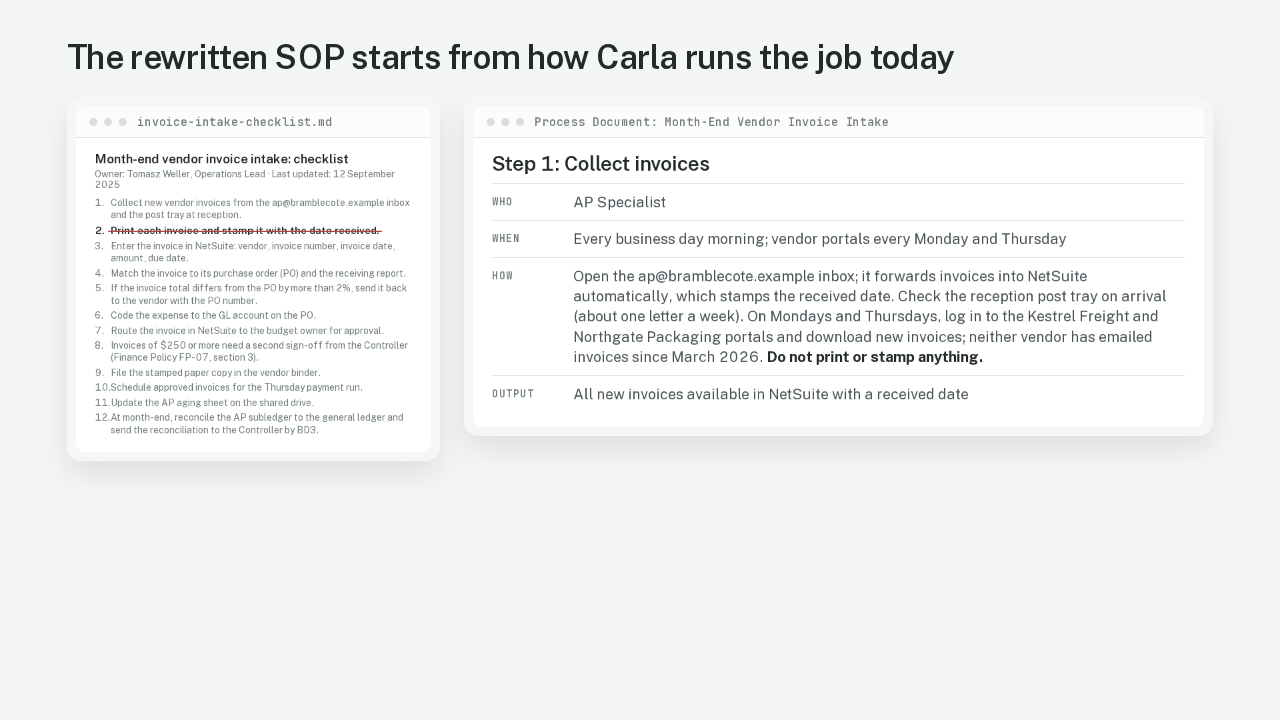
The rewritten SOP starts from how Carla runs the job today
Month-end vendor invoice intake: checklist
- 1.Collect new vendor invoices from the ap@bramblecote.example inbox and the post tray at reception.
- 2.Print each invoice and stamp it with the date received.
- 3.Enter the invoice in NetSuite: vendor, invoice number, invoice date, amount, due date.
- 4.Match the invoice to its purchase order (PO) and the receiving report.
- 5.If the invoice total differs from the PO by more than 2%, send it back to the vendor with the PO number.
- 6.Code the expense to the GL account on the PO.
- 7.Route the invoice in NetSuite to the budget owner for approval.
- 8.Invoices of $250 or more need a second sign-off from the Controller (Finance Policy FP-07, section 3).
- 9.File the stamped paper copy in the vendor binder.
- 10.Schedule approved invoices for the Thursday payment run.
- 11.Update the AP aging sheet on the shared drive.
- 12.At month-end, reconcile the AP subledger to the general ledger and send the reconciliation to the Controller by BD3.
Step 1: Collect invoices
Back to step two, print and stamp. The new SOP's first step now tells the next person, do not print or stamp anything, and that line came straight from Carla's recording. As the ops lead, I ruled on every step that changed. Which checklist on your team still describes the job the way it ran a year ago?