One UniFi MCP server can now manage a fleet of controllers

3 hours ago

UniFi MCP Server 0.6.0 is the first published release since 0.2.6, and it includes the never-released 0.5.0. The headline is fleet mode: one server routing your AI agent's tool calls to many UniFi controllers. It stays off until you point it at a Postgres database.

Ask about this presentation

Chapters
  1. 0:00One server, many controllers
  2. 0:22Per-call controller routing
  3. 0:41Roles and audit
  4. 1:00Shared connections and cache
  5. 1:17Ansible, Helm and the fleet image
  6. 1:36Dry-run, read-only, metrics
  7. 1:52Security
  8. 2:10Fixes
  9. 2:37Changes to make from 0.2.6
  10. 3:00Upgrade
Show transcript
  1. UniFi MCP Server 0.6.0 is the first published release since 0.2.6, and it includes the never-released 0.5.0. The headline is fleet mode: one server routing your AI agent's tool calls to many UniFi controllers. It stays off until you point it at a Postgres database.

    Slide text
    enuno avatar

    unifi-mcp-server 0.6.0

    One UniFi MCP server can now manage a fleet of controllers

    Fleet mode stays off until you set DATABASE_URL.

    Fleet mode
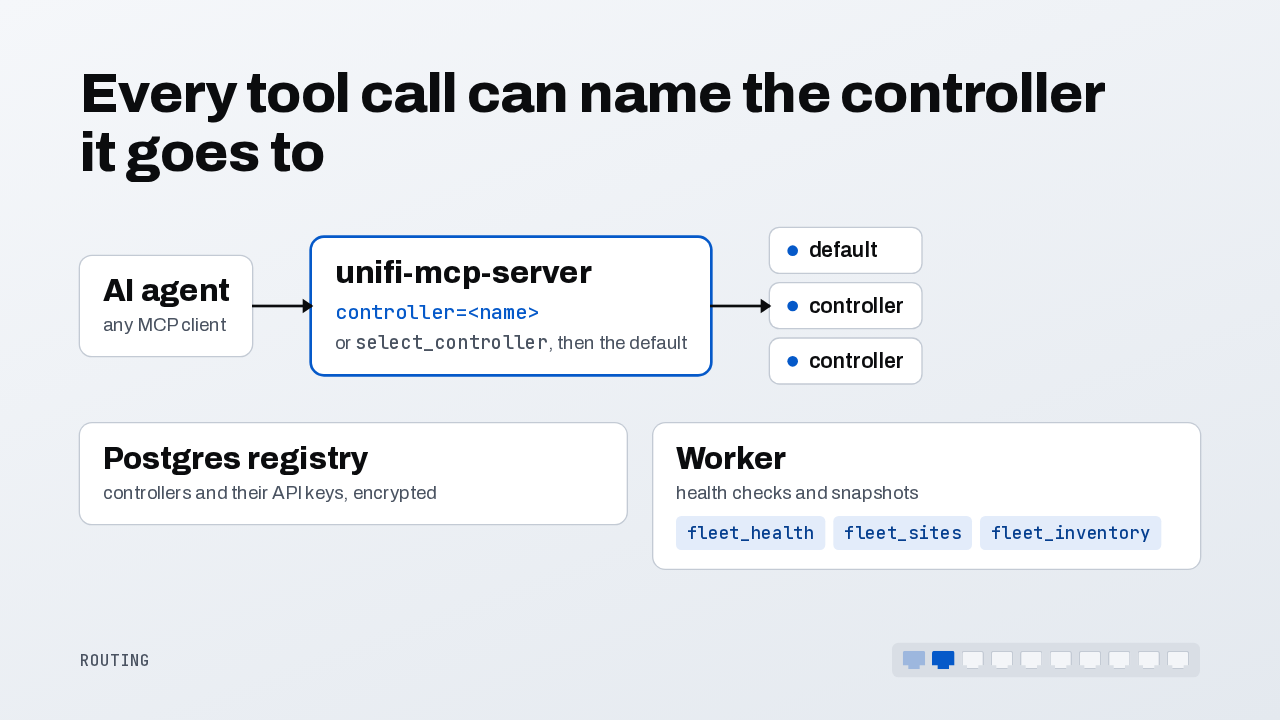
  2. Every tool that talks to a controller now takes an optional controller argument. Without it, the call goes to the one you selected, then the default. Controllers and their encrypted API keys live in Postgres. A worker health-checks each one, so fleet-wide reads answer from its snapshots.

    Slide text

    Every tool call can name the controller it goes to

    AI agent
    any MCP client
    unifi-mcp-server
    controller=<name>
    or select_controller, then the default
    default
    controller
    controller
    Postgres registry
    controllers and their API keys, encrypted
    Worker
    health checks and snapshots
    fleet_health fleet_sites fleet_inventory
    Routing
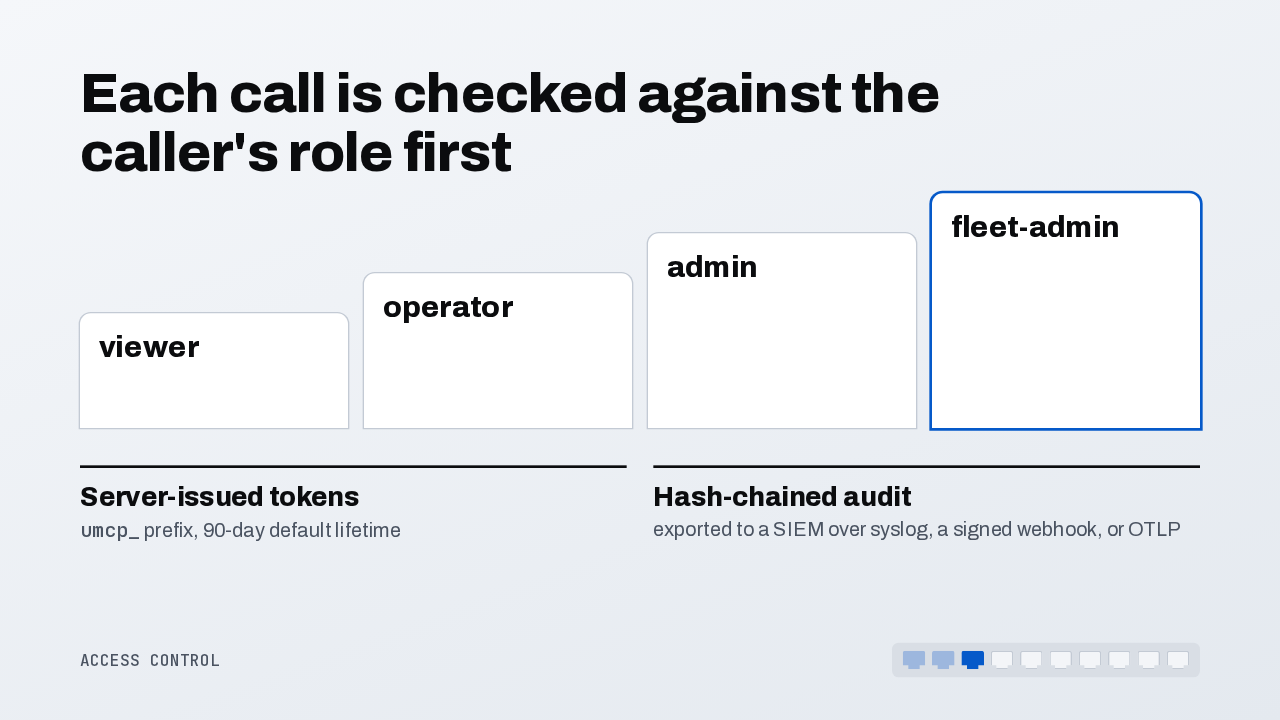
  3. Every tool is now classed as read, write or destructive, and the caller's role decides which it may use, checked before any controller is contacted. With a database, the server issues its own API tokens. And every write lands in a hash-chained audit log you can stream to your security tooling.

    Slide text

    Each call is checked against the caller's role first

    viewer
    operator
    admin
    fleet-admin
    Server-issued tokens
    umcp_ prefix, 90-day default lifetime
    Hash-chained audit
    exported to a SIEM over syslog, a signed webhook, or OTLP
    Access control
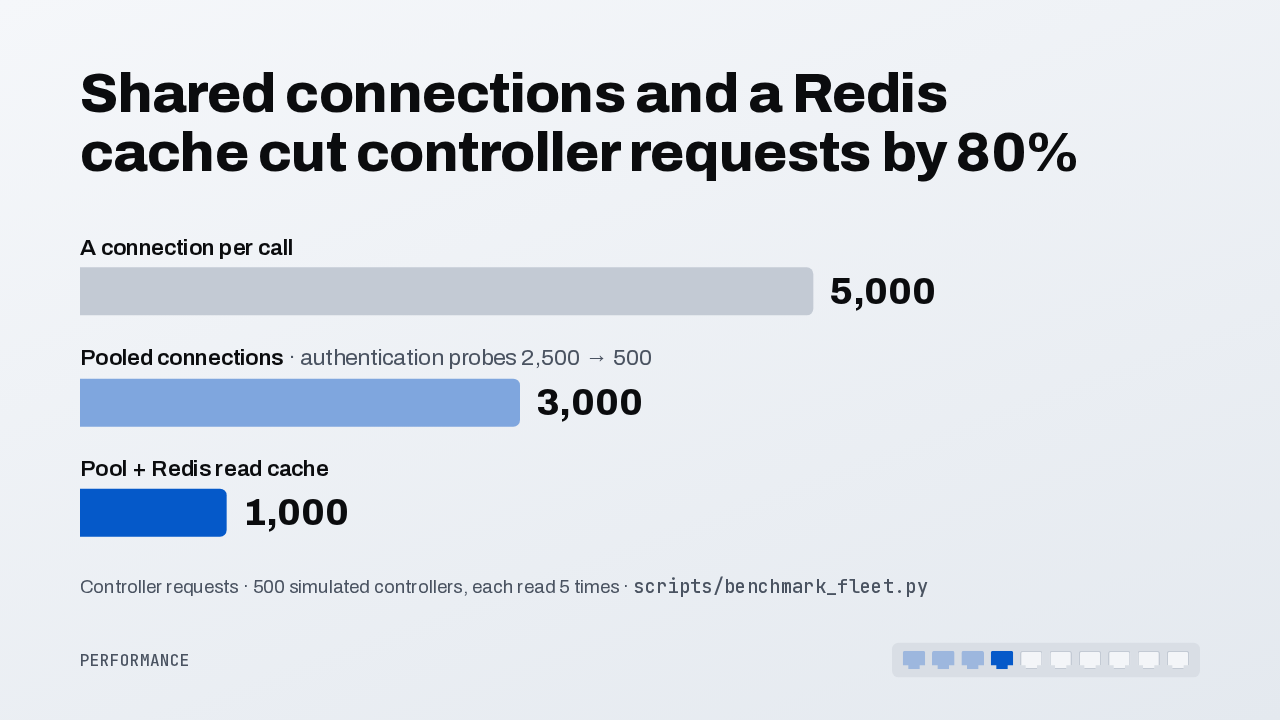
  4. Calls now share one connection per controller. On 500 simulated controllers, read five times each, a connection per call means 5,000 requests. Pooling brings that to 3,000. Add the Redis read cache and it's 1,000, which is 80 percent fewer.

    Slide text

    Shared connections and a Redis cache cut controller requests by 80%

    A connection per call
    5,000
    Pooled connections · authentication probes 2,500 → 500
    3,000
    Pool + Redis read cache
    1,000

    Controller requests · 500 simulated controllers, each read 5 times · scripts/benchmark_fleet.py

    Performance
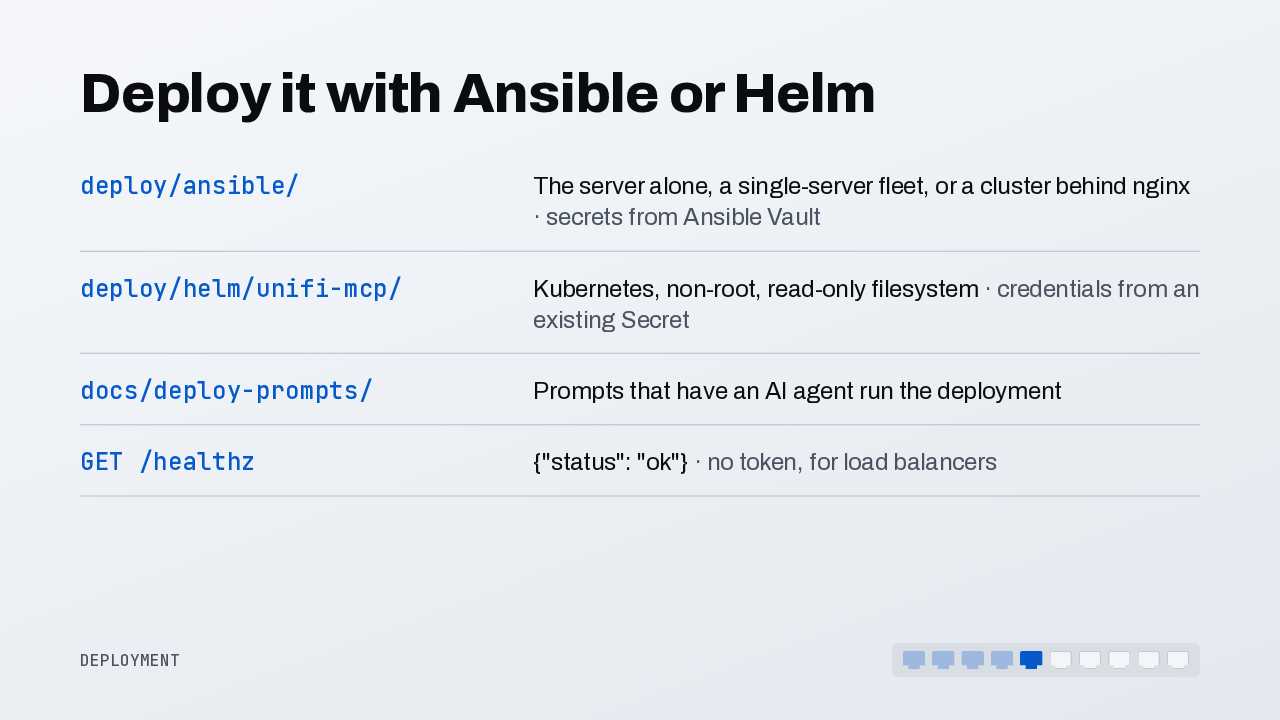
  5. You can now deploy the server with Ansible or Helm. The playbook covers the server alone, a single-server fleet, or a cluster behind nginx. The Helm chart runs it on Kubernetes, with credentials from an existing Secret. Ready-made prompts let an AI agent run the deployment for you.

    Slide text

    Deploy it with Ansible or Helm

    deploy/ansible/
    The server alone, a single-server fleet, or a cluster behind nginx · secrets from Ansible Vault
    deploy/helm/unifi-mcp/
    Kubernetes, non-root, read-only filesystem · credentials from an existing Secret
    docs/deploy-prompts/
    Prompts that have an AI agent run the deployment
    GET /healthz
    {"status": "ok"} · no token, for load balancers
    Deployment
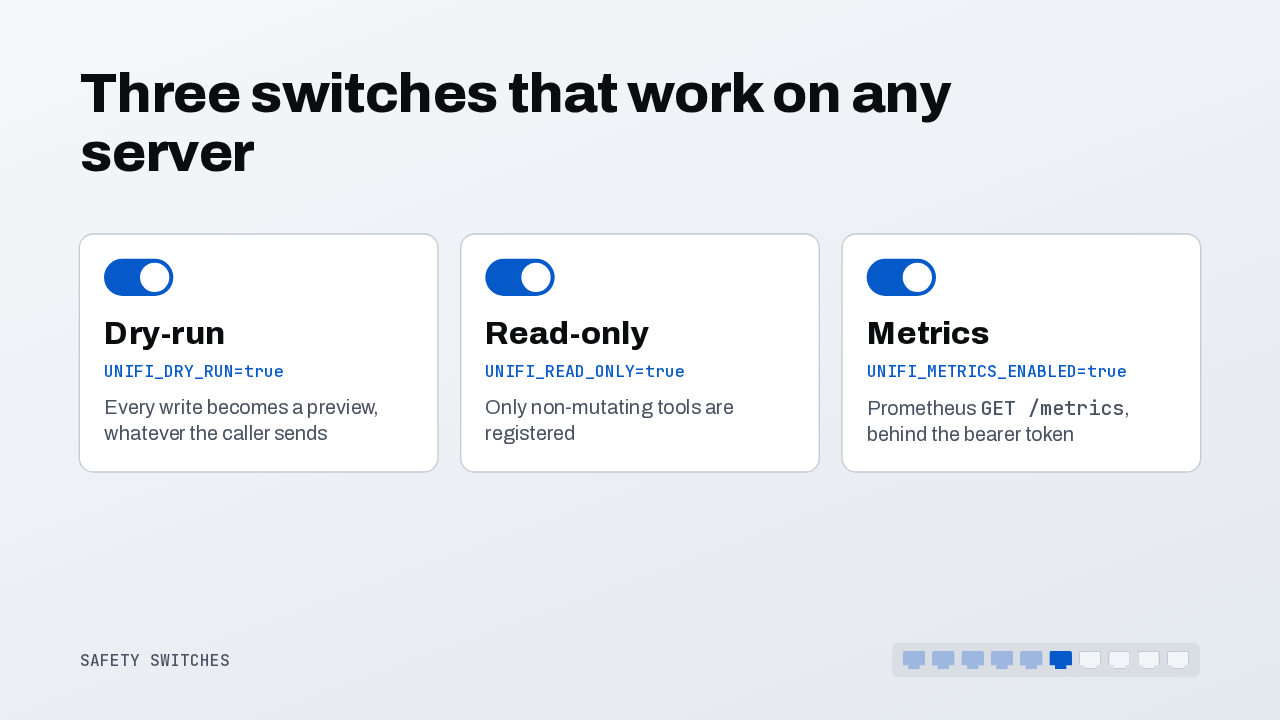
  6. On a single server, these switches matter most. Dry-run turns every write into a preview, whatever the model sends. Read-only registers only tools that change nothing. And a Prometheus endpoint counts every tool call and how long it took.

    Slide text

    Three switches that work on any server

    Dry-run
    UNIFI_DRY_RUN=true
    Every write becomes a preview, whatever the caller sends
    Read-only
    UNIFI_READ_ONLY=true
    Only non-mutating tools are registered
    Metrics
    UNIFI_METRICS_ENABLED=true
    Prometheus GET /metrics, behind the bearer token
    Safety switches
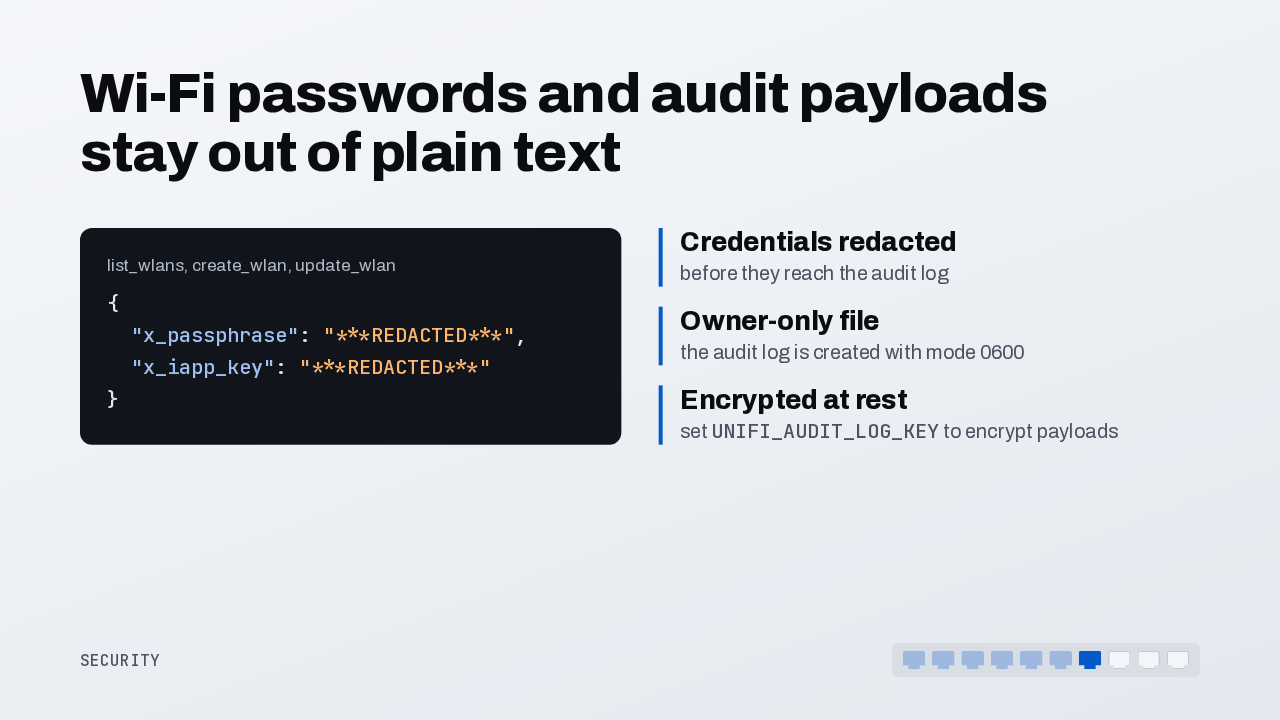
  7. Two leaks are closed. The wireless network tools used to return the WPA passphrase in plain text, straight into the model's context. Now it comes back redacted. The audit log redacts credentials, is readable by its owner only, and with an audit key set, encrypts its payloads.

    Slide text

    Wi-Fi passwords and audit payloads stay out of plain text

    list_wlans, create_wlan, update_wlan{ "x_passphrase": "***REDACTED***", "x_iapp_key": "***REDACTED***" }
    Credentials redacted
    before they reach the audit log
    Owner-only file
    the audit log is created with mode 0600
    Encrypted at rest
    set UNIFI_AUDIT_LOG_KEY to encrypt payloads
    Security
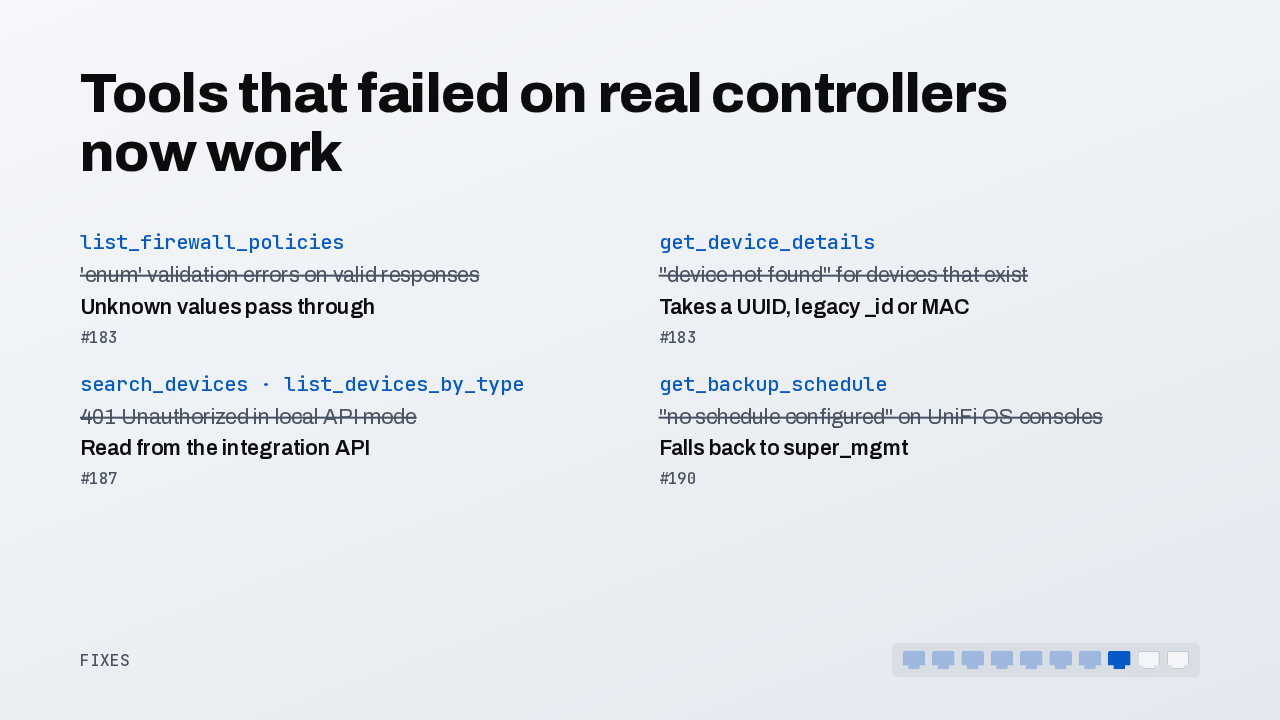
  8. Several tools that failed on real controllers now work. Firewall policy lists accept values the models didn't know, and device details find a device by UUID, legacy ID or MAC address. Device search works in local API mode, and UniFi OS consoles report their backup schedule. 0.5.0 adds dozens more fixes, including the end of the four-minute retry hangs.

    Slide text

    Tools that failed on real controllers now work

    list_firewall_policies
    'enum' validation errors on valid responses
    Unknown values pass through
    #183
    get_device_details
    "device not found" for devices that exist
    Takes a UUID, legacy _id or MAC
    #183
    search_devices · list_devices_by_type
    401 Unauthorized in local API mode
    Read from the integration API
    #187
    get_backup_schedule
    "no schedule configured" on UniFi OS consoles
    Falls back to super_mgmt
    #190
    Fixes
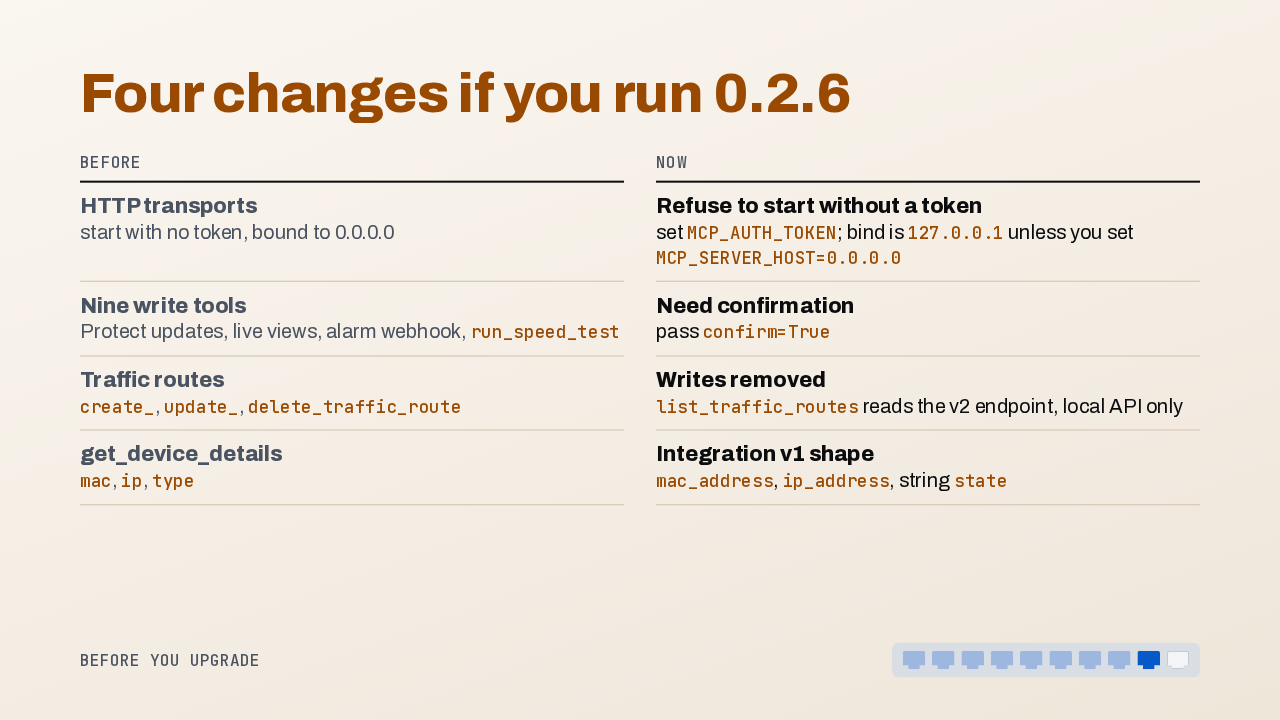
  9. Coming from 0.2.6, four changes from 0.5.0 need your attention. HTTP transports refuse to start without an auth token, and bind to localhost by default, so set the token and send it as a bearer header. Nine write tools now need confirm set to true. Traffic route writes are gone for now. And device details use new field names.

    Slide text

    Four changes if you run 0.2.6

    Before
    Now
    HTTP transportsstart with no token, bound to 0.0.0.0
    Refuse to start without a tokenset MCP_AUTH_TOKEN; bind is 127.0.0.1 unless you set MCP_SERVER_HOST=0.0.0.0
    Nine write toolsProtect updates, live views, alarm webhook, run_speed_test
    Need confirmationpass confirm=True
    Traffic routes create_, update_, delete_traffic_route
    Writes removed list_traffic_routes reads the v2 endpoint, local API only
    get_device_details mac, ip, type
    Integration v1 shape mac_address, ip_address, string state
    Before you upgrade
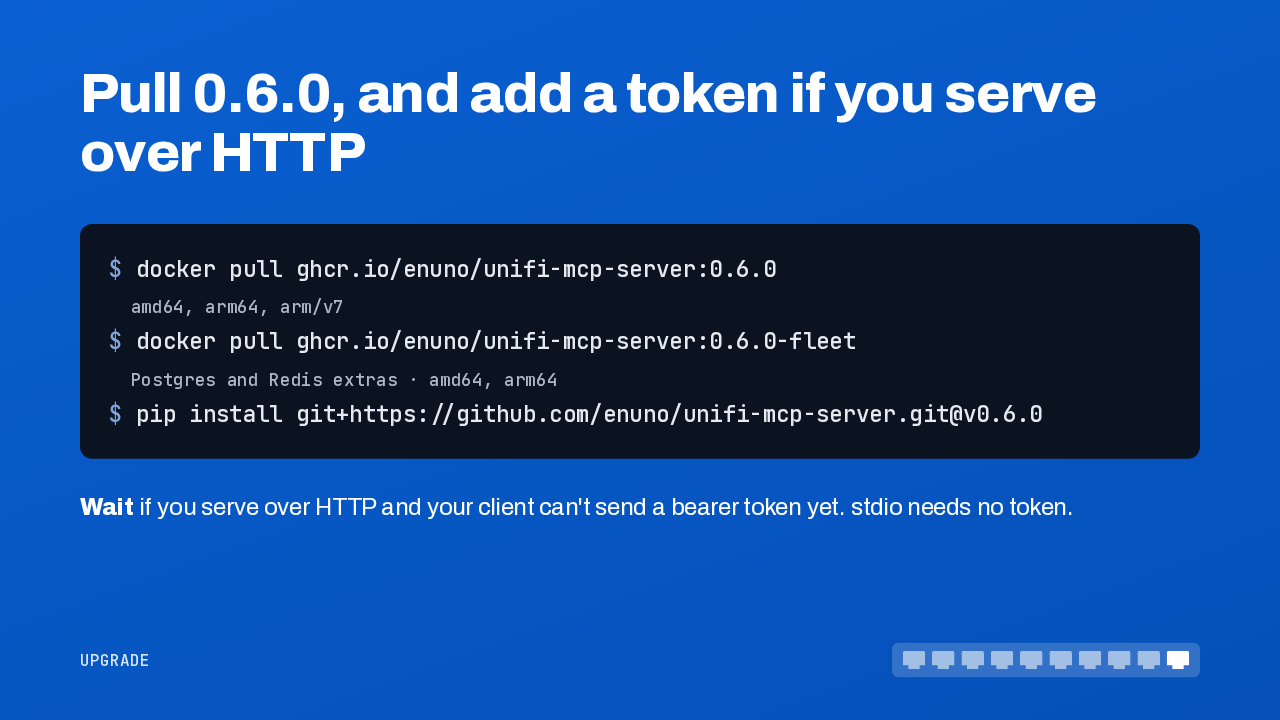
  10. To upgrade, pull 0.6.0, or the fleet image for Postgres and Redis. If you serve over HTTP and your client can't send a bearer token yet, fix that first. Those request savings come from a simulated fleet, so measure your own. Give it a database, and one UniFi MCP server can now manage your whole fleet of controllers.

    Slide text

    Pull 0.6.0, and add a token if you serve over HTTP

    $ docker pull ghcr.io/enuno/unifi-mcp-server:0.6.0 amd64, arm64, arm/v7 $ docker pull ghcr.io/enuno/unifi-mcp-server:0.6.0-fleet Postgres and Redis extras · amd64, arm64 $ pip install git+https://github.com/enuno/unifi-mcp-server.git@v0.6.0

    Wait if you serve over HTTP and your client can't send a bearer token yet. stdio needs no token.

    Upgrade

What happened in AI today, in your inbox

One short email each evening. Read it and you’re caught up.

Built in New York with ❤️